The trojanized Claude Code extension on Cursor: how to find the SSH backdoor and clean it up
Cursor's marketplace served a tampered Claude Code extension, 2.1.312 and 2.1.313, that planted an SSH key and tunnel. How to check, clean up, and harden.
- Published
- Reading time
- 6 min read
Key takeaways
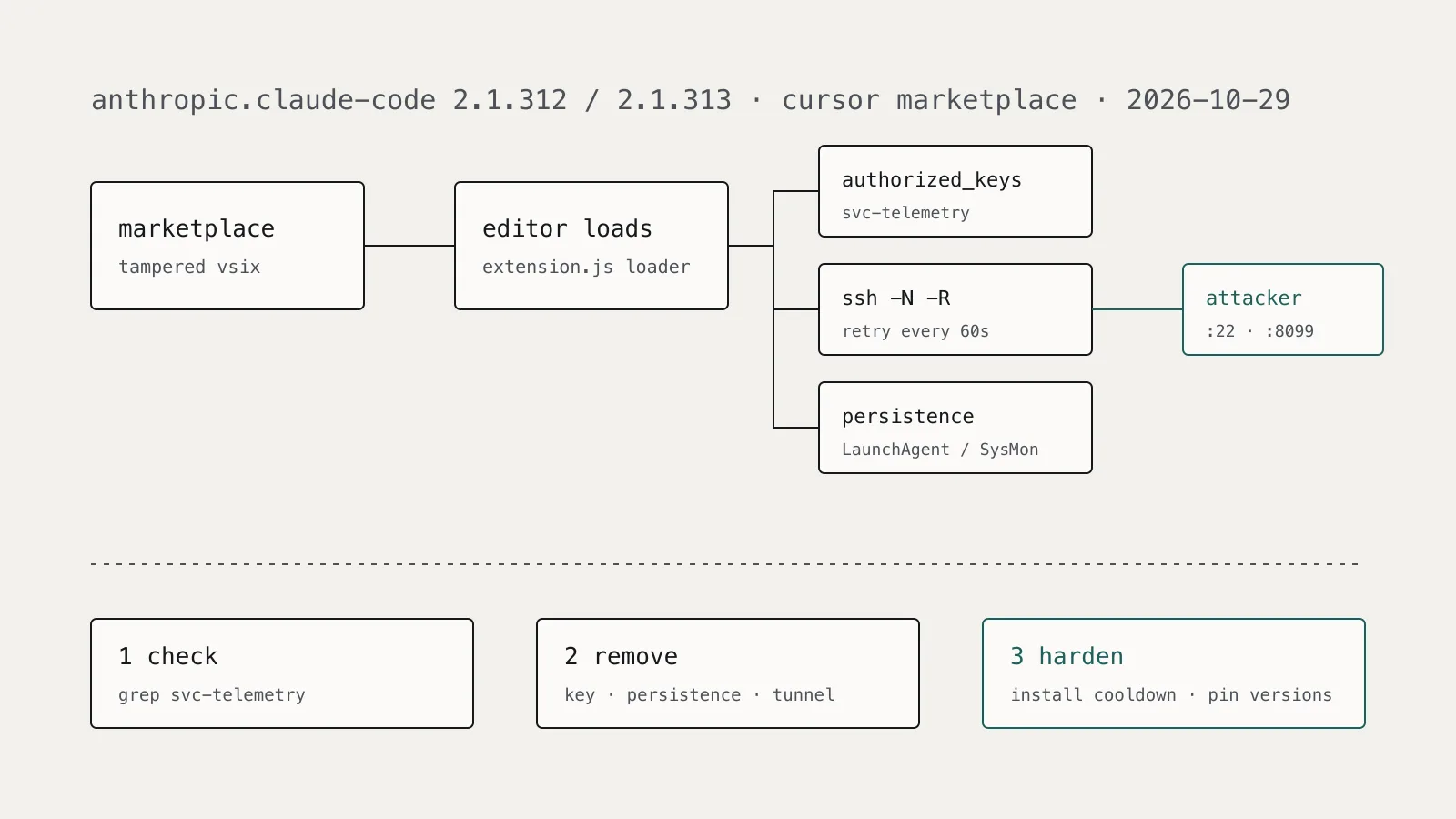
- Cursor's extension marketplace served modified anthropic.claude-code versions 2.1.312 and 2.1.313 for macOS and Windows on October 29, 2026, from about 2:27 a.m. to 1:35 p.m. Pacific Time.
- Cursor states the tampered versions were not developed by Anthropic, and Microsoft confirmed they were not distributed through the Visual Studio Marketplace or the npm Claude Code package.
- The loader ran when the extension loaded, added an SSH key with the comment svc-telemetry to authorized_keys, tried to open a reverse SSH tunnel to 134.209.82.225, and installed persistence.
- Uninstalling the extension is not enough, because the payload left a LaunchAgent, crontab entry, scheduled task, or Startup script that keeps retrying the tunnel.
- A marketplace install cooldown longer than the exposure window would have kept the malicious versions off machines that respected it, which is why cooldowns are worth setting for AI coding tool extensions.
On this page
- What happened?
- What did the malicious extension do?
- Why most backdoors probably did not work
- How do I check a machine?
- How do I clean up an affected machine?
- What would have reduced the exposure?
- Set an install cooldown
- Allowlist extensions, and pin the risky ones
- Make persistence noisy
- What should I still double-check?
If anyone in your organization uses Cursor and had the Claude Code extension installed or updated on October 29, 2026, check those machines for an SSH key with the comment svc-telemetry. Versions 2.1.312 and 2.1.313 of anthropic.claude-code served from Cursor's marketplace that day carried a loader that added an attacker key, tried to open a reverse SSH tunnel, and installed persistence. Removing the extension does not remove the backdoor.
This article covers what was affected, how to check a machine, how to clean it up, and the install controls that reduce the window for the next tampered extension.
What happened?
According to Cursor's security notice, a modified version of the Claude Code extension was available in the Cursor VS Code Extension Marketplace on October 29, 2026, between about 2:27 a.m. and 1:35 p.m. Pacific Time. The affected versions are 2.1.312 and 2.1.313, for macOS and Windows. Cursor says these versions were not developed by Anthropic.
Microsoft's analysis confirms the package was not distributed through the Visual Studio Marketplace or the npm package @anthropic-ai/claude-code. SecurityWeek reports that Anthropic said its official channels were not affected and released a legitimate version, 2.1.314, to avoid confusion. Researcher Kevin Beaumont estimated that roughly 5,000 developer systems might have downloaded the malicious versions; treat that as an estimate, not a count.
Cursor removed the version, shut down its whole marketplace as a precaution, audited access, rotated its keys, rebuilt the marketplace, and worked with the hosting provider to take the attacker's server offline. Cursor's notice does not say how the tampered version was published.
What did the malicious extension do?
The attacker prepended a JavaScript loader to the extension's entry point. Microsoft describes it running when the module loads, before normal initialization, with no interaction needed. It did the following:
- Reconnaissance. Collected hostname, username, OS, architecture, home and working directories, global Git email, and public IP. It also listed up to 40 environment variable names containing words like KEY, TOKEN, SECRET, PASS, AWS, or GCP. Microsoft notes it sent names, not values.
- SSH key. Appended an embedded Ed25519 public key with the comment
svc-telemetrytoauthorized_keysif that marker was missing. - Reverse tunnel. Tried to enable the local SSH service, wrote a private tunnel key to a hidden temp file named
.stk_plus ten hex characters, and ranssh -N -R(orautosshon Unix-like systems) to 134.209.82.225 as usertunnel, with host key checking disabled. It retried 60 seconds after the connection dropped. - Persistence. Installed a user LaunchAgent on macOS, a crontab
@rebootentry on Linux, or a scheduled task namedSysMonwith a Startup-folder fallback on Windows. - Beacon. Posted host details to
http://134.209.82.225:8099/beacon.
Why most backdoors probably did not work
Enabling the SSH server needs administrator rights, which the extension lacked on most hosts, so Cursor believes the attacker likely could not log in through the tunnel. BleepingComputer reports that Phorion found the macOS check misread an access error and skipped activation, and the Windows path called PowerShell through /bin/sh.
That is not a reason to skip cleanup. The key was still written, persistence was still installed, and host details were still sent. A developer who later turns on Remote Login or OpenSSH Server for an unrelated reason would complete the attacker's setup for them.
How do I check a machine?
Start with the key marker. Cursor names it as the deciding indicator: if the key is present, the machine is affected.
# macOS and Linux
grep -n "svc-telemetry" ~/.ssh/authorized_keys
ls -la ~/.config/.smt ~/.config/.smtk ~/Library/LaunchAgents/com.apple.sysmond.plist 2>/dev/null
ls -la "${TMPDIR:-/tmp}"/.stk_* /tmp/.stk_* 2>/dev/null
crontab -l 2>/dev/null | grep -n ".config/.smt"
pgrep -fl "ssh -N -R|autossh"
# Windows (elevated PowerShell for the ProgramData file)
Select-String -Path "$env:USERPROFILE\.ssh\authorized_keys","C:\ProgramData\ssh\administrators_authorized_keys" -Pattern "svc-telemetry" -ErrorAction SilentlyContinue
Get-ScheduledTask -TaskName SysMon -ErrorAction SilentlyContinue
Test-Path "$env:USERPROFILE\.config\smt.cmd","$env:APPDATA\Microsoft\Windows\Start Menu\Programs\Startup\sysmon.cmd"
The names com.apple.sysmond and SysMon imitate monitoring components. Microsoft advises inspecting each object's configured action before deleting it, and treating filename matches as leads rather than proof.
For a fleet, search network telemetry for 134.209.82.225 on TCP 22 and 8099, and file telemetry for the payload hash Microsoft published, ecb58cb29078d9646ad1dcdbe51526f2d9cfea06be5fb2ab183e8ecc3ab6bf15. Microsoft's post includes Defender XDR hunting queries for the IP, the files, the scheduled task, and the LaunchAgent. Extension-install telemetry that records versions is the fastest way to build the list of machines to check.
How do I clean up an affected machine?
Follow this order, which combines Cursor's and Microsoft's guidance:
- Preserve and isolate. Copy the extension package, the modified
authorized_keys, the scripts, and the startup entries before cleanup, then isolate the machine. - Remove the key. Delete only the entry with the
svc-telemetrycomment, after confirming the fingerprintSHA256:0Z6R+DF64Do2nwQic8a7kkfDLNNk4IiK+2U2Rci4htk. Keep legitimate keys. - Remove persistence. On macOS, unload and delete the LaunchAgent and the
.smtand.smtkfiles. On Linux, remove only the@rebootcrontab line. On Windows, delete theSysMontask,sysmon.cmdin Startup, andsmt.cmdandsmtkunder%USERPROFILE%\.config. - Stop the tunnel. Kill the
ssh,autossh, or PowerShell retry processes and delete.stk_files. - Remove the extension and update to a clean version from an official channel.
- Verify after a restart that nothing comes back. Cursor's remediation scripts (
remediate-macos.sh, run as the user, andremediate-windows.ps1, run elevated) exit non-zero if anything remains; read them before running.
Then decide on credentials. The loader did not read secret values, but it listed which sensitive variable names existed, and an attacker with a working tunnel could have read anything the user could. If a machine had SSH enabled, or you cannot rule out a session, rotate credentials reachable from it from a trusted system and rebuild. Our Black October response guide covers rotating AI provider keys at the issuer rather than only replacing the stored value.
What would have reduced the exposure?
This was a marketplace problem, not a developer mistake: the extension carried the expected publisher and arrived through the editor's normal update path. Controls that work here are ones that do not depend on the developer noticing anything.
Set an install cooldown
Cursor's security hardening guide describes a Marketplace Install Cooldown that defers extension installs and updates until a version has been public for a set number of hours, enforced fleet-wide, to blunt short-lived malicious uploads. Team owners and admins set it under Team settings, Security & automation; the default is 0, which disables it.
The malicious versions were live for about eleven hours. By that timeline, a cooldown of 24 hours would have kept them off machines that respected it. That is our inference from the published window, not a claim Cursor makes. Cursor also notes that cooldowns and signature verification are client-side controls that complement, but do not replace, marketplace-side analysis.
Allowlist extensions, and pin the risky ones
Cursor supports restricting installs to approved publishers or extension IDs through the team dashboard or MDM (AllowedExtensions). An allowlist would not have stopped this case on its own, because the tampered package used the trusted ID. Pinning versions does help. In VS Code, the extensions.allowed setting accepts exact versions per extension, since ranges are not supported:
{
  "extensions.allowed": {
    "anthropic.claude-code": ["2.1.314"],
    "microsoft": true
  }
}
Exact pinning is work to maintain, so reserve it for extensions that run with agent privileges, read source and credentials, or execute commands. AI coding assistants sit in that group.
Make persistence noisy
The loader relied on writes that are rare on a developer laptop: a new authorized_keys entry, a LaunchAgent with an Apple-style name, a scheduled task requesting SYSTEM, and an outbound ssh -R. Alerting on those four events catches this payload and many others. Keeping Remote Login and OpenSSH Server off by policy on laptops that do not need them is why most of these backdoors failed.
What should I still double-check?
How the tampered version reached Cursor's marketplace has not been published, so watch Cursor's notice for a root cause and updated indicators. If you use other AI coding assistants, the incident is a reminder that the instructions, extensions, and files those tools load are all part of the attack surface, as we covered in the AGENTS.md hijack.