LiteLLM 1.107.0 was compromised: how to check exposure and respond
LiteLLM 1.107.0 wheels and Docker images shipped a credential stealer and a remote code loader. How to check your hosts, clean up, and rotate secrets.
- Published
- Reading time
- 6 min read
Key takeaways
- All seven LiteLLM 1.107.0 wheels published to PyPI on October 21, 2026 contained a credential stealer and an hourly remote code loader; the sdist and version 1.106.2 did not.
- The malicious cook.pth and sitecustomize.py files run on every Python startup in the environment, even if nothing imports litellm, and pip uninstall does not remove them.
- LiteLLM Docker images tagged v1.107.0, latest, main-latest, and main-stable on GHCR and Docker Hub carried the same payload before they were pulled.
- Any host or container that installed or ran 1.107.0 should be treated as compromised: rebuild it and rotate every credential it could read, including provider keys stored in a LiteLLM proxy database.
- Pinning dependencies by hash and container images by digest stops a newly published malicious version from reaching a build automatically.
On this page
LiteLLM 1.107.0, published to PyPI on October 21, 2026, was malicious. All seven of its prebuilt wheels contained a credential stealer and a remote code loader, and the project's Docker images for that release carried the same files. If any machine, CI job, or container installed or ran 1.107.0, treat it as compromised: rebuild it, and rotate every secret it could read. The last version reported clean is 1.106.2.
This article summarizes what is known as of October 21, 2026, how to check for exposure, and what to change so the next poisoned release does not reach production automatically. Details are still being investigated, so check the sources linked below for updates.
What happened to LiteLLM 1.107.0?
LiteLLM is a widely used Python library and proxy that gives applications one API across many model providers. That makes it a high-value target: hosts that run it usually hold API keys for several providers.
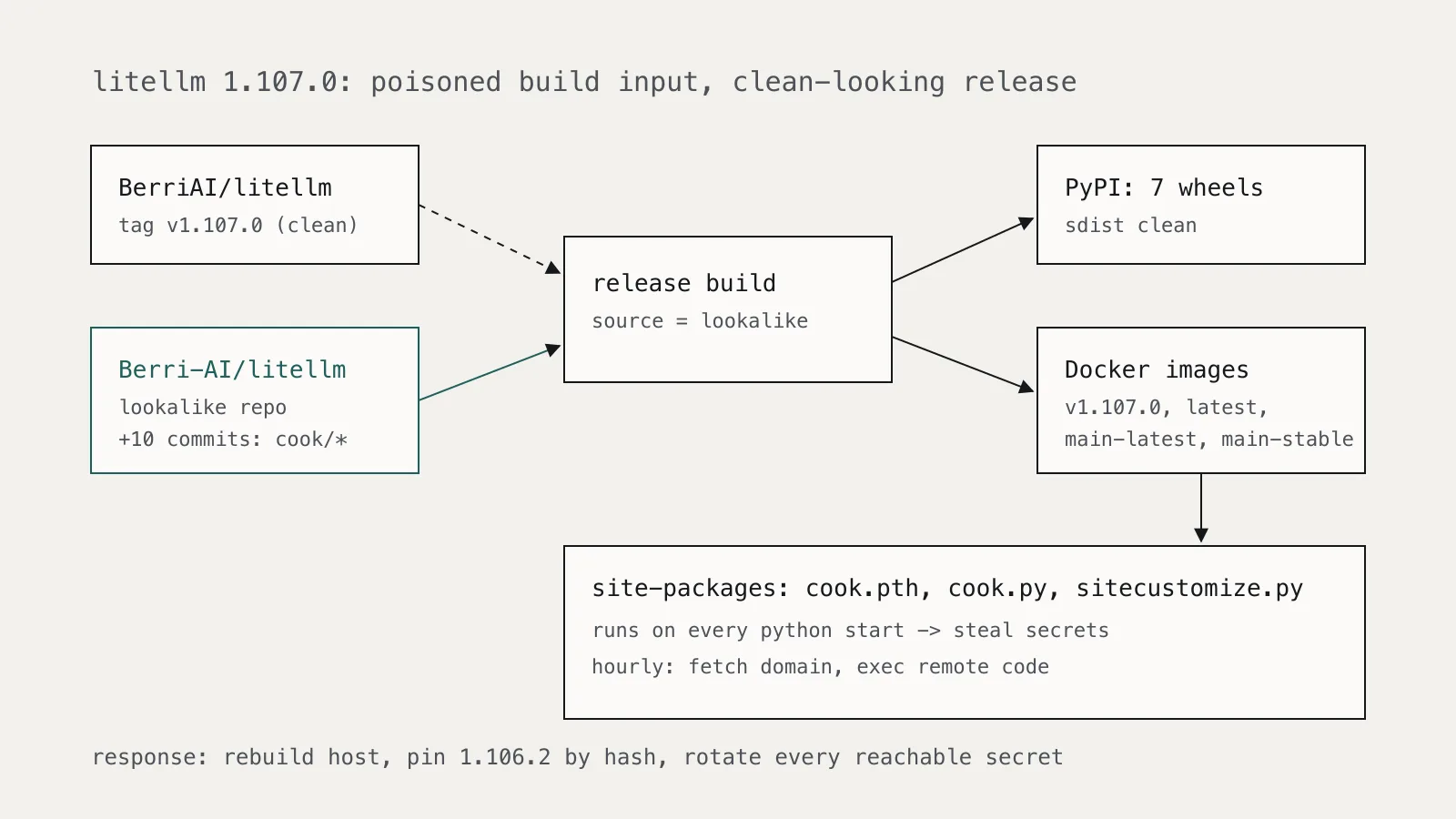
According to AISLE's analysis, eight files for 1.107.0 were uploaded to PyPI between 11:39:51 and 11:40:13 UTC: seven wheels and one source distribution. AISLE's dependency firewall flagged the first wheel about three minutes after upload. The malicious files were present in all seven wheels but not in the sdist, and AISLE found nothing malicious in the v1.107.0 tag of the source repository. PyPI later removed the release; at the time of writing, PyPI lists 1.106.2 as the latest version.
The Docker images were affected too. Wiz reports that trojanized images were published to GHCR and Docker Hub under the v1.107.0, latest, main-latest, and main-stable tags, including the litellm-database and litellm-non_root variants, and were removed later that day.
How did the malicious code get into the release?
The repository source was not the problem; the build input was. In the public incident report on the LiteLLM issue tracker, an outside researcher used the SLSA build provenance attached to the images to show that 1.107.0 was built from a lookalike repository, Berri-AI/litellm (with a hyphen), rather than BerriAI/litellm. That lookalike carried ten extra commits on top of the real release tag that added the payload and wired it into the packaging and Dockerfiles. Earlier releases from the same pipeline recorded the genuine repository as their source.
Wiz reports that BerriAI said the malicious actions were taken through three engineers' GitHub accounts, apparently using stolen GitHub CLI OAuth tokens, and that all tokens involved have been revoked. The full root cause had not been published at the time of writing.
OX Security notes this is the second LiteLLM compromise on PyPI this year, after versions 1.82.7 and 1.82.8 in March, and says this attack used different tooling and infrastructure.
What does the payload do?
The wheels add three files to site-packages: cook.pth, cook.py, and sitecustomize.py. Python processes .pth files and imports sitecustomize automatically at startup, so the code runs on every Python start in that environment, whether or not anything imports litellm. AISLE notes that uninstalling litellm with pip does not remove these files.
Based on the AISLE and OX analyses, the payload has two parts:
- Credential stealer (
cook.py). Collects browser passwords and history, SSH, GPG, and TLS private keys, shell history, AWS, GCP, and Azure credentials including instance metadata, Kubernetes service-account tokens, CI/CD and developer tool secrets, AI coding tool configuration, all environment variables, and litellm's database configuration. It encrypts the archive and posts it towww.litellm.dev, a lookalike of the reallitellm.aidomain. It runs once per host, guarded by a marker file in/tmp. - Remote code loader (
sitecustomize.py). Forks a background process that, every hour, reads a domain name from a file on GitHub, then downloads and executes code from that domain. AISLE and the issue report both found the file empty during analysis, which means no second-stage code had been delivered yet, but the attacker could have changed that at any time.
The issue report adds that when the proxy runs with a database configured, the payload dumps the tables where the proxy stores upstream provider credentials. That means a compromised proxy can leak every provider key it manages, not just the keys in its own environment.
How do I check whether I was affected?
Start with an inventory: every virtualenv, CI runner, notebook host, and container image that could have resolved litellm on October 21, 2026. Lockfiles, CI logs, and registry pull logs answer this faster than scanning hosts.
On any candidate host, look for the dropped files and the markers AISLE published:
# Dropped files in any Python environment on the host
find / -path '*site-packages/*' \( -name 'cook.pth' -o -name 'cook.py' \) 2>/dev/null
find / -path '*site-packages/sitecustomize.py' 2>/dev/null   # inspect any hit; legitimate ones exist

# Run marker and loader lock from the AISLE report
ls -la /tmp/.pc_once_72129118c59f5636c0bb /tmp/remote_code_loader.lock 2>/dev/null

# Installed version in the current environment
python -m pip show litellm 2>/dev/null | grep -i '^version'
Then check the network side. Search proxy, DNS, and egress logs for litellm.dev and for requests to raw.githubusercontent.com/letters9813/pythonclient-test. AISLE also lists the request header X-Token: XWiA8gZNa7NcX2XRoAEb and the SHA-256 hashes of all seven malicious wheels, which you can match against artifact caches and internal mirrors.
A missing marker file is not proof of safety. The issue report notes that the stealer copy inside sitecustomize.py does not write the marker, and containers discard /tmp when they restart. Evidence of installation is enough to act on.
What should I do if a host ran 1.107.0?
- Isolate, then rebuild. Removing the three files is not enough on its own, because the loader can execute arbitrary code. Rebuild the virtualenv, runner, or image from a known-good base. Stop any Python process holding
/tmp/remote_code_loader.lockfirst. - Pin a clean version. AISLE and Wiz name 1.106.2 as the most recent clean release; OX's table lists 1.106.0. Either avoids 1.107.0. Pin container images by digest, not by tag.
- Rotate everything the host could read. That includes model provider API keys, cloud credentials, SSH keys, CI/CD tokens, database passwords, Kubernetes tokens, and passwords saved in browsers on developer machines. If you run the LiteLLM proxy with a database, rotate every provider key stored in it and reissue virtual keys.
- Hunt for use of stolen credentials. Review cloud audit logs and provider usage dashboards from October 21 onward for activity you do not recognize, including unexpected spend.
- Block the indicators. Deny
litellm.devand the GitHub dead-drop URL at egress, and add the wheel hashes to your artifact scanning.
How do you keep the next poisoned release out?
This incident fits a pattern we have covered before: the dangerous code arrives through the build and release path rather than through reviewed source. Several controls would have stopped 1.107.0 from reaching production automatically:
- Pin dependencies by hash. pip's hash-checking mode refuses any file whose hash is not already recorded in your requirements file, so a new release cannot slip in through a version range or an unpinned dependency.
- Pin images by digest. A tag like
latestormain-stablecan be repointed at any time. A digest cannot. - Add a cooldown before new versions reach production. AISLE flagged this release about three minutes after upload, and PyPI pulled it the same day. Holding new versions for a short period before automatic adoption gives scanners and the community time to catch a bad release before it reaches you.
- Keep secrets out of the environments that install packages. CI jobs that resolve dependencies should not hold deploy or provider keys, a principle we covered in Running AI coding agents in GitHub Actions without leaking secrets.
- Restrict egress from build and runtime hosts. A proxy that can only reach its model providers cannot post an archive to a lookalike domain.
The same discipline applies to dependencies your AI coding tools suggest, which can be outright invented; see Slopsquatting: how to stop hallucinated packages in AI-generated code from reaching production.
For publishers, the lesson is about provenance. The build provenance here recorded the wrong source repository, and that is what exposed the attack. Verifying provenance before publishing, and alerting when a release is built from anything other than the canonical repository, turns that record from evidence after the fact into a control.