Permission-aware RAG: enforcing document access control in retrieval
How to stop a RAG assistant from retrieving documents the user cannot open: filter by identity inside the vector query, sync ACLs, and test for leaks.
- Published
- Reading time
- 7 min read
Key takeaways
- A RAG assistant must only retrieve chunks the requesting user is allowed to read in the source system; the model cannot be trusted to withhold text it has already been given.
- Enforce access control as a filter inside the vector query, built from the authenticated identity on the server, never from a value the client or the model supplies.
- Filtering after an approximate top-k search silently drops results; with pgvector HNSW defaults, a filter matching 10% of rows returns about 4 rows on average.
- Copy each document's ACL onto every chunk at ingestion and re-sync it when permissions change, or revoked users keep retrieving the content.
- Embeddings are sensitive data: research has recovered 92% of 32-token inputs exactly from their embeddings, so protect the vector store like the source documents.
On this page
- Why do RAG systems leak documents across users?
- Where should the access check happen?
- What does a permission-aware retrieval pipeline look like?
- At ingestion
- At query time
- Filter inside the search, not after it
- A Postgres example with row-level security
- How do you keep permissions in sync?
- Are embeddings themselves sensitive?
- How do you test that retrieval respects permissions?
- Checklist
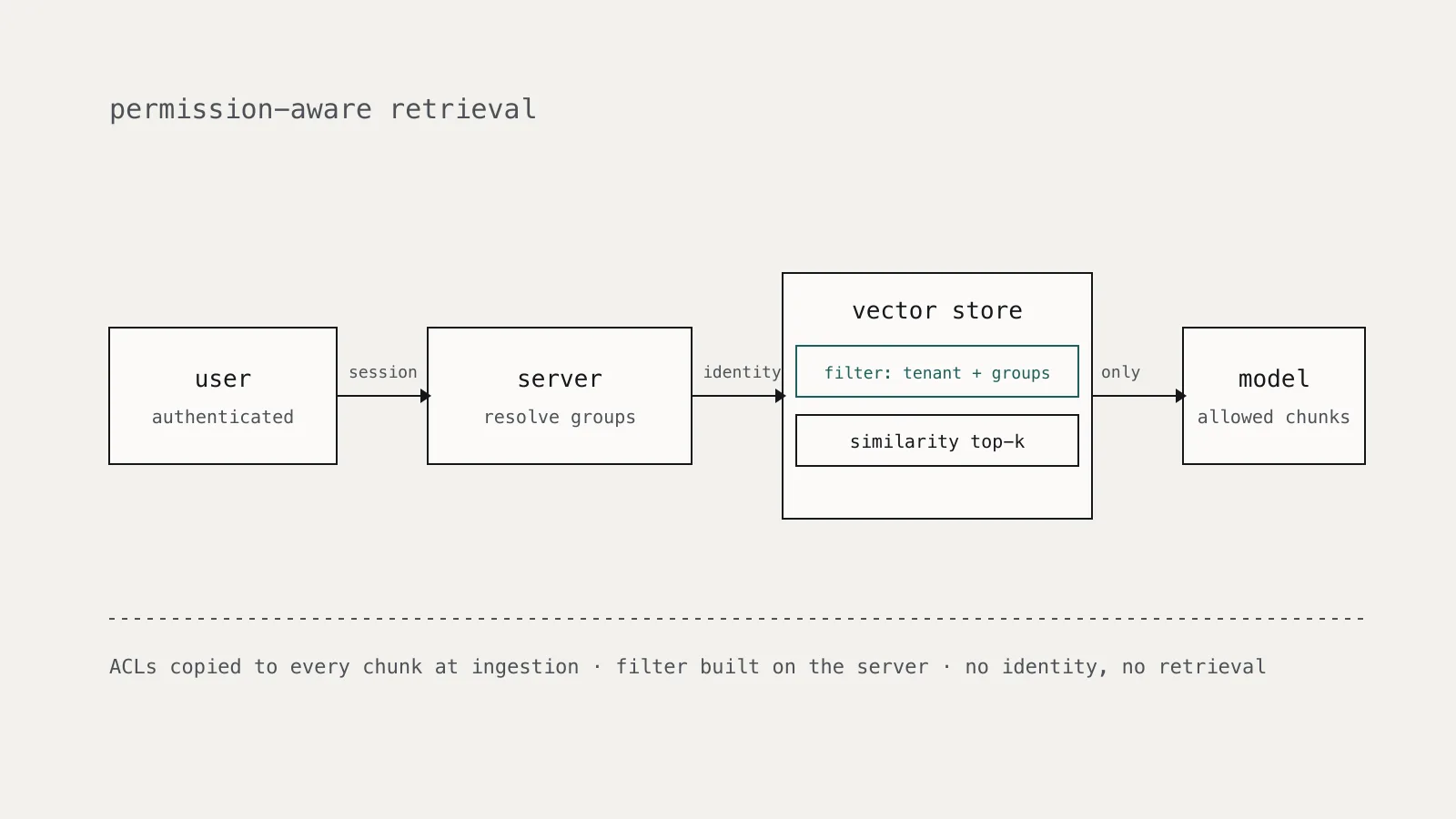
A retrieval-augmented generation (RAG) assistant should only retrieve text the requesting user could already open in the source system. The reliable way to guarantee that is to attach each document's access list to every chunk at ingestion and apply an identity-based filter inside the vector query itself, built on the server from the authenticated session. Anything that relies on the model to "not mention" restricted content, or that filters after retrieval, will leak.
This article covers the failure modes, a reference design, and the tests that catch regressions.
Why do RAG systems leak documents across users?
Most RAG prototypes index everything into one collection and search it for every user. That works in a demo with public documentation. It fails the day someone indexes the HR share, the board folder, or customer tickets.
The OWASP Top 10 for LLM Applications lists this under LLM08:2025 Vector and Embedding Weaknesses. Its examples include unauthorized access through weak access controls and cross-context leaks in shared vector databases, where one group's embeddings surface in another group's queries. Its first mitigation is to "implement fine-grained access controls and permission-aware vector and embedding stores."
Three design mistakes cause most of these leaks:
- One index, no filter. Similarity search ranks every chunk in the corpus, so the most relevant chunk wins regardless of who owns it.
- Asking the model to enforce policy. A system prompt saying "do not reveal confidential documents" is not a control. Once a chunk is in the context window, the user can often extract it, directly or through prompt injection.
- Permissions frozen at ingestion. ACLs are copied once and never updated, so a user removed from a project keeps retrieving its documents.
Where should the access check happen?
At retrieval, before any text reaches the model. The model receives only chunks the user is entitled to, so there is nothing restricted for it to repeat, summarize, or be tricked into revealing.
The identity that drives the filter must come from your authenticated session on the server. Never accept a user ID, group list, or tenant ID from the request body, a URL parameter, or a tool call the model generated. If the model can choose the filter, a prompt injection can widen it.
Microsoft's documentation for the security filter pattern in Azure AI Search makes the point explicitly: the principal stored on each document "is just a string, used in a filter expression." The search service does no authentication of its own in that pattern. Your application has to resolve who the user is and which groups they belong to, then pass exactly those groups into every query.
What does a permission-aware retrieval pipeline look like?
At ingestion
For every source document, read its permissions from the system of record (file share, wiki, ticketing system) and store them on every chunk produced from it. Typical fields:
tenant_idfor hard multi-tenant separationallowed_groupsandallowed_usersas lists of stable identifiers, not display namessource_idandsource_versionso you can re-sync and audit- a classification label if your policy depends on it
Store identifiers, not resolved membership. Group membership changes more often than document ACLs, and resolving it at query time keeps revocation fast.
At query time
- Authenticate the user and resolve their current groups from your identity provider, with a short cache.
- Build the filter on the server from that identity.
- Run the similarity search with the filter applied inside the query.
- Pass only the returned chunks to the model, with their source IDs so answers can cite them.
Filter inside the search, not after it
Filtering after an approximate top-k search looks equivalent but is not. The pgvector documentation is precise about this: with approximate indexes, "filtering is applied after the index is scanned." It gives the example that if a condition matches 10% of rows, with HNSW and the default hnsw.ef_search of 40, only 4 rows will match on average. pgvector 0.8.0 added iterative index scans (hnsw.iterative_scan) to scan further when filters remove too many candidates.
Post-filtering in application code has the same problem, plus a worse one: the unfiltered results already left the database and sat in your process. Push the filter into the store, check that your index supports filtered search efficiently, and measure recall for users with narrow permissions.
A Postgres example with row-level security
If your vectors live in Postgres, row-level security moves the check into the database so a forgotten WHERE clause cannot bypass it. Once RLS is enabled on a table, every normal read must be allowed by a policy, and if no policy exists the default is deny.
ALTER TABLE chunks ENABLE ROW LEVEL SECURITY;
ALTER TABLE chunks FORCE ROW LEVEL SECURITY;

CREATE POLICY chunk_read ON chunks FOR SELECT
  USING (
    tenant_id = current_setting('app.tenant_id')::uuid
    AND allowed_groups && string_to_array(current_setting('app.groups'), ',')::uuid[]
  );
The application connects as a role without BYPASSRLS, sets the session values from the authenticated user at the start of each transaction, and then runs an ordinary similarity query:
BEGIN;
SELECT set_config('app.tenant_id', $1, true);
SELECT set_config('app.groups', $2, true);
SELECT id, content
FROM chunks
ORDER BY embedding <=> $3
LIMIT 8;
COMMIT;
Two details from the Postgres documentation matter here. Superusers and roles with BYPASSRLS always bypass row security, and table owners do too unless you set FORCE ROW LEVEL SECURITY. Run the retrieval service under a dedicated, non-owner role. Using set_config with the local flag set to true scopes the values to the transaction, so a pooled connection does not carry one user's groups into the next request.
How do you keep permissions in sync?
Copied ACLs go stale. Plan for three events:
- Permission change on a document. Subscribe to change events or poll the source system's audit log, then update the ACL fields on every chunk with that
source_id. Updating metadata is cheaper than re-embedding. - User removed from a group. Handled automatically if you resolve membership at query time. Keep the group cache short.
- Document deleted. Delete its chunks. A tombstone in the source must remove the vectors too.
Track sync lag as an operational metric. The time between revoking access in the source system and the last successful retrieval of that content is your effective revocation window, and it belongs in the system's record in your AI model inventory.
Are embeddings themselves sensitive?
Yes. Treat the vector store with the same classification as the documents it was built from. In Text Embeddings Reveal (Almost) As Much As Text (EMNLP 2023), Morris and colleagues recovered 92% of 32-token text inputs exactly from their embeddings and showed full names could be recovered from embeddings of clinical notes. OWASP LLM08 lists embedding inversion as a risk for the same reason.
In practice that means:
- No shared, unauthenticated vector database endpoints, even on internal networks.
- Encryption at rest and access logging on the vector store, as for the source data.
- Separate collections or databases per tenant when contracts or regulation require hard isolation, rather than relying on a metadata filter alone.
- Redacting or excluding fields at ingestion that should never be retrievable by anyone.
How do you test that retrieval respects permissions?
Add an authorization test suite that runs in CI against a seeded index:
- Create test users in different groups and tenants, plus documents with known ACLs and distinctive marker strings.
- For each user, run queries designed to match restricted documents closely, and assert that no marker from a document they cannot read appears in the retrieved chunks.
- Revoke a test user's access in the fixture source, run the sync, and assert the content stops appearing.
- Call the retrieval service with a missing or unresolvable identity and assert it returns nothing.
- Attempt to pass a group or tenant ID in the request payload and assert it is ignored.
Assert on retrieved chunks, not on the model's answer. The answer is non-deterministic; the retrieval set is not.
Checklist
- Every chunk carries
tenant_idand the source document's ACL identifiers. - The identity filter is built on the server from the authenticated session, never from client or model input.
- The filter runs inside the vector query, and filtered recall is measured.
- The retrieval role cannot bypass row-level or collection-level controls.
- ACL changes and deletions in the source propagate, and sync lag is monitored.
- The vector store is classified, encrypted, and access-logged like the source data.
- CI tests prove users cannot retrieve documents outside their permissions.