Loading third-party model weights safely: pickle, weights_only, and safetensors
Why loading a pickled model file can run attacker code, and the concrete controls that stop it: safetensors, weights_only, pinned revisions, and CI gates.
- Published
- Reading time
- 6 min read
Key takeaways
- Loading a pickle-based model file can execute arbitrary code, so an untrusted checkpoint should be treated like an untrusted executable.
- Prefer safetensors for model weights, because the format stores tensors and metadata rather than instructions for rebuilding Python objects.
- Since PyTorch 2.6, torch.load defaults to weights_only=True; code that sets weights_only=False on a third-party file reopens the code-execution path.
- Setting trust_remote_code=True runs Python from the model repository, so pin it to a reviewed commit hash rather than a branch name.
- Hub-side pickle scanning reduces risk but is explicitly best-effort; enforce your own loading policy in code review and CI.
On this page
Loading a third-party model checkpoint can run code on your machine. PyTorch's traditional .pt, .pth, and .bin files are built on Python's pickle format, and unpickling can import and call arbitrary functions. The fix is a loading policy: use safetensors where possible, keep PyTorch's weights_only restriction on, pin custom model code to a reviewed commit, and enforce all three in CI.
This matters to more than ML researchers. Any service that pulls a fine-tuned checkpoint, a LoRA adapter, or an embedding model from a hub or a shared bucket has a software supply chain, and the model file is part of it.
Why is a model file able to execute code?
Python's documentation is blunt about it. The pickle module page warns that the module is not secure and that malicious pickle data can execute arbitrary code during unpickling.
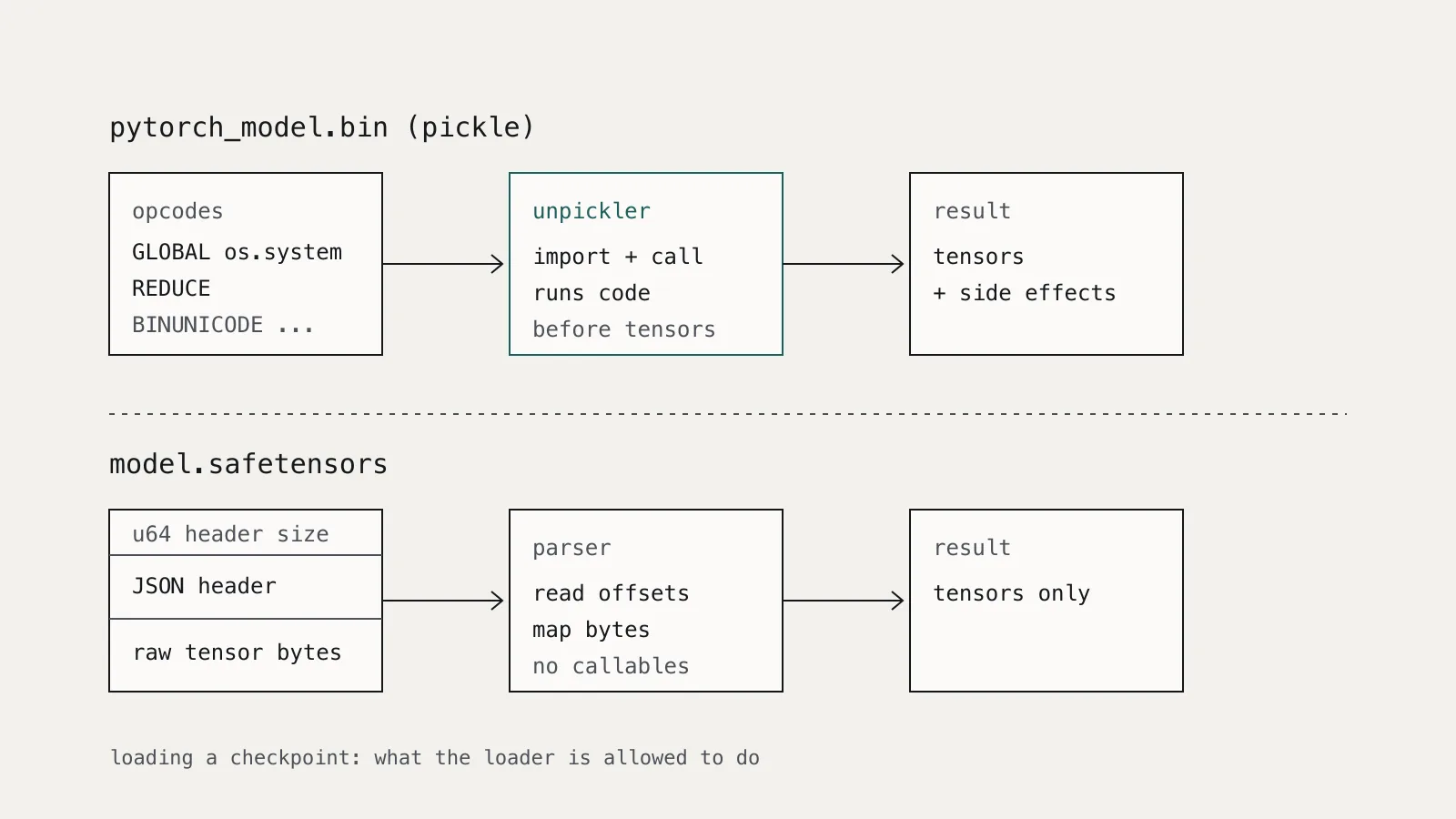
The reason is structural. A pickle is not a passive description of data; it is a small program of opcodes that the unpickler runs to rebuild objects. Hugging Face's pickle security guide identifies the dangerous opcodes: GLOBAL and STACK_GLOBAL tell the unpickler to import something, and REDUCE tells it to call that thing with arguments. Import exec or os.system, call it with a string, and the file runs whatever the author wanted, before your code ever sees a tensor.
The same guide shows that you can inspect those opcodes without executing them using the standard library's pickletools:
import pickletools

# Prints the opcode stream without running it.
# Look for GLOBAL / STACK_GLOBAL entries that import anything
# beyond the tensor and collection types you expect.
with open("pytorch_model.bin", "rb") as f:
    pickletools.dis(f)
Note that modern PyTorch checkpoints are zip archives with the pickle stored inside (typically data.pkl), so you would extract that member first. For routine use, a scanner that walks the opcodes is more practical than reading disassembly by hand.
What are the safer loading options?
There are three layers, and you want all of them.
Prefer safetensors
Safetensors is a format for storing tensors safely, as opposed to pickle. A file is a header describing tensor names, shapes, and dtypes, followed by raw bytes. Loading it means parsing that header and mapping bytes into tensors; there is no step where the file names a Python callable to invoke.
The Transformers library already leans this way. Its model loading guide says from_pretrained() loads safetensors weights when they are available, and describes them as more secure than pickle-serialized weights. You can make the preference explicit:
from transformers import AutoModelForCausalLM

model = AutoModelForCausalLM.from_pretrained(
    "org/model-name",
    revision="<commit-sha>",   # pin, do not float on "main"
    use_safetensors=True,      # state the intent: safetensors only
)
Setting use_safetensors=True states the intent in code rather than relying on what happens to be in the repository. Test how your installed version behaves against a pickle-only repository: what you want is a loud failure, which turns a quiet risk into a visible decision.
For raw tensors outside Transformers, use the safetensors API directly:
from safetensors.torch import load_file

state_dict = load_file("adapter_model.safetensors")
model.load_state_dict(state_dict)
Keep weights_only on for torch.load
When you must read a pickle-based checkpoint, PyTorch's restricted unpickler is the next line of defence. In the current torch.serialization source, the warning on torch.load reads, in bold, "Never load data from an untrusted source," and the error message explains that PyTorch 2.6 changed the default of weights_only from False to True.
With weights_only=True, the unpickler only reconstructs tensors, primitive types, dictionaries, and types you explicitly allow through torch.serialization.add_safe_globals(). That last escape hatch is narrow by design: allow-list the specific classes your own checkpoints need, not whole modules.
The risk is that the error message also tells developers that re-running with weights_only=False "will likely succeed." It will, and it re-enables full pickle execution. That one keyword argument is the line to look for in code review.
PyTorch reads two environment variables that help enforce policy at the process level:
# Force the restricted unpickler for every torch.load in this process,
# even where a call site passes weights_only=False.
export TORCH_FORCE_WEIGHTS_ONLY_LOAD=1
The opposite variable, TORCH_FORCE_NO_WEIGHTS_ONLY_LOAD, disables the restriction only for call sites that did not set weights_only explicitly. It should never appear in a production environment, and it is worth alerting on if it does.
Pin and review remote code
Weights are not the only executable part of a model repository. Some architectures ship their own Python modelling code, which Transformers runs only when you pass trust_remote_code=True. The Transformers guide advises extra caution with custom models and recommends loading them from a specific revision, a commit hash, so the code cannot change underneath you after you reviewed it.
A branch name like main is mutable. A commit hash is not. Pin the hash, review the Python files at that commit the same way you would review a new dependency, and record the hash wherever you track the model.
How do these risks map to OWASP?
The OWASP Top 10 for LLM Applications 2025 covers this under LLM03, Supply Chain. It calls out vulnerable pre-trained models, weak model provenance, and malicious LoRA adapters, and recommends supplier vetting, integrity checks with signing or hashes, and SBOM-style tracking of components.
Code execution on load is the most immediate of these, because it compromises the host before any model behaviour is tested. A backdoored model that loads cleanly is a different, harder problem; safe loading does not solve it, but it does remove the easiest path to your credentials and network.
Our guide to building an AI model inventory covers the other fields worth recording alongside the revision.
What should a loading policy look like?
Write it down, keep it short, and enforce it mechanically. A workable baseline:
- Format. Third-party weights load from safetensors. Pickle formats require a documented exception with an owner.
torch.load. Never called withweights_only=Falseon a file that did not come from your own training pipeline. Production images setTORCH_FORCE_WEIGHTS_ONLY_LOAD=1.- Revisions. Every hub download pins a commit hash. No floating branches in production configuration.
- Remote code.
trust_remote_code=Truerequires a reviewed, pinned commit and a named reviewer. - Isolation. Converting or inspecting an untrusted pickle happens in a sandbox with no credentials and no outbound network, never on a developer laptop with cloud keys.
Items 1 to 4 are greppable, which means a CI check can enforce them in a few lines:
# Fail the build on risky loading patterns outside an allow-listed path.
if grep -rnE "weights_only[[:space:]]*=[[:space:]]*False|trust_remote_code[[:space:]]*=[[:space:]]*True|TORCH_FORCE_NO_WEIGHTS_ONLY_LOAD" \
     --include="*.py" --include="*.yaml" --include="*.env" src/ deploy/ \
     | grep -v "^src/approved_loaders/"; then
  echo "Risky model-loading pattern found; see the model loading policy."
  exit 1
fi
A grep will not catch everything, and it should not be the only check. Its value is that it makes the unsafe path require a visible exception in a reviewed directory, rather than a single keyword argument that slips through a large diff.
Where does this fit with agent security?
Teams building LLM agents tend to focus on what the model might do at runtime: prompt injection, tool misuse, data leakage. Those risks are real, and we argued in prompt injection is an access-control problem that they are best handled by authorizing every action outside the model.
Model loading is the step before all of that. If a checkpoint can run code during from_pretrained, it does not need to persuade the model of anything; it already has the process. Put the loading policy in place first, then build runtime controls on a host you can trust.