Denial of wallet: rate limits and cost controls for LLM applications
How to stop abuse and runaway agents from burning your LLM budget: per-user token budgets, max_tokens caps, provider spend limits, and alerts.
- Published
- Reading time
- 7 min read
Key takeaways
- Denial of wallet is a cost attack: an attacker or a runaway agent drives paid model usage until the bill, not the service, becomes the outage.
- Rate limit LLM features by tokens and money per identity, not only by requests per second, because one request can cost more than a thousand times as much as another.
- Set max_tokens on every call and cap input length before the request leaves your server; these are the only per-request cost bounds you fully control.
- Provider spend limits are a last-resort backstop, not a control: they stop every user at once, so set them as a ceiling above your own per-user and per-feature budgets.
- Stolen model API keys are monetized quickly, so keep keys server-side, scope them per workload, and alert on spend that deviates from the normal daily pattern.
On this page
- What is denial of wallet?
- How expensive can a stolen key get?
- Why are request-based rate limits not enough?
- Where should each cost control sit?
- 1. Per request: cap input and output
- 2. Per user: a token or cost budget
- 3. Per agent run: bound the loop
- 4. Per feature and environment: separate keys and limits
- 5. Organization: the provider spend limit
- How do you protect the keys themselves?
- What should you monitor and alert on?
- Is denial of wallet only about money?
- A checklist for LLM cost controls
Denial of wallet is an attack where someone drives paid LLM usage until the bill becomes the incident. The defense is a set of nested budgets enforced on your server: cap input size and max_tokens on every request, meter tokens and cost per user and per feature, bound agent loops, and keep the provider's spend limit as a backstop above all of them. Request-per-second rate limits alone do not work, because LLM requests vary enormously in cost.
This article covers how the attack works, where to put each control, and what to alert on.
What is denial of wallet?
The OWASP Top 10 for LLM Applications covers it under LLM10:2025 Unbounded Consumption. OWASP describes applications that let users run excessive, uncontrolled inference, leading to denial of service, financial loss, model theft, or degraded service. Its examples include variable-length input floods, continuous input overflow, resource-intensive queries, and "Denial of Wallet" by name.
Classic denial of service tries to take a service down. Denial of wallet usually leaves the service up. Pay-per-token pricing means the service scales with the attack, and the damage lands on the invoice.
Three sources of unbounded spend show up in practice:
- Abusive users. Someone scripts your free-tier chatbot, pastes maximum-length inputs, or uses your feature as a free general-purpose model.
- Runaway automation. An agent that retries a failing tool, or loops between two steps, can make hundreds of calls without anyone noticing.
- Stolen credentials. Someone takes your model API key or cloud credentials and uses your account for their own traffic.
How expensive can a stolen key get?
Sysdig's Threat Research Team documented this in its May 2024 report on LLMjacking. Attackers took cloud credentials from a system running a vulnerable Laravel version (CVE-2021-3129), then checked which AI services those credentials could reach, including AWS Bedrock.
The reconnaissance was quiet. The attackers sent Bedrock InvokeModel calls with an invalid parameter, so a validation error rather than an access-denied error told them the model was enabled, without running a real query. They also checked whether model invocation logging was turned on. Sysdig observed a reverse-proxy tool that would let the attackers resell access while the victim paid.
Sysdig estimated the worst case at over $46,000 per day. That figure assumed an attacker reaching a 500,000 tokens-per-minute quota in four regions on Claude 2.x pricing at the time. Treat it as an illustration of scale, not a forecast for your account, but note that the arithmetic only needs quota, price, and time.
Why are request-based rate limits not enough?
A typical API gateway limits requests per second per client. For an LLM feature, that number says little about cost. A request with a 20-token question and a 100-token answer and a request with a 150,000-token pasted document and a 4,000-token answer count the same against a request limit, but their costs differ by more than three orders of magnitude.
Providers already meter by tokens. Anthropic's rate limits documentation defines Messages API limits as requests per minute, input tokens per minute, and output tokens per minute. It also notes the API uses a token bucket algorithm, so capacity refills continuously instead of resetting at fixed intervals. Your own limits should follow the same shape: meter tokens and estimated cost, per identity.
Where should each cost control sit?
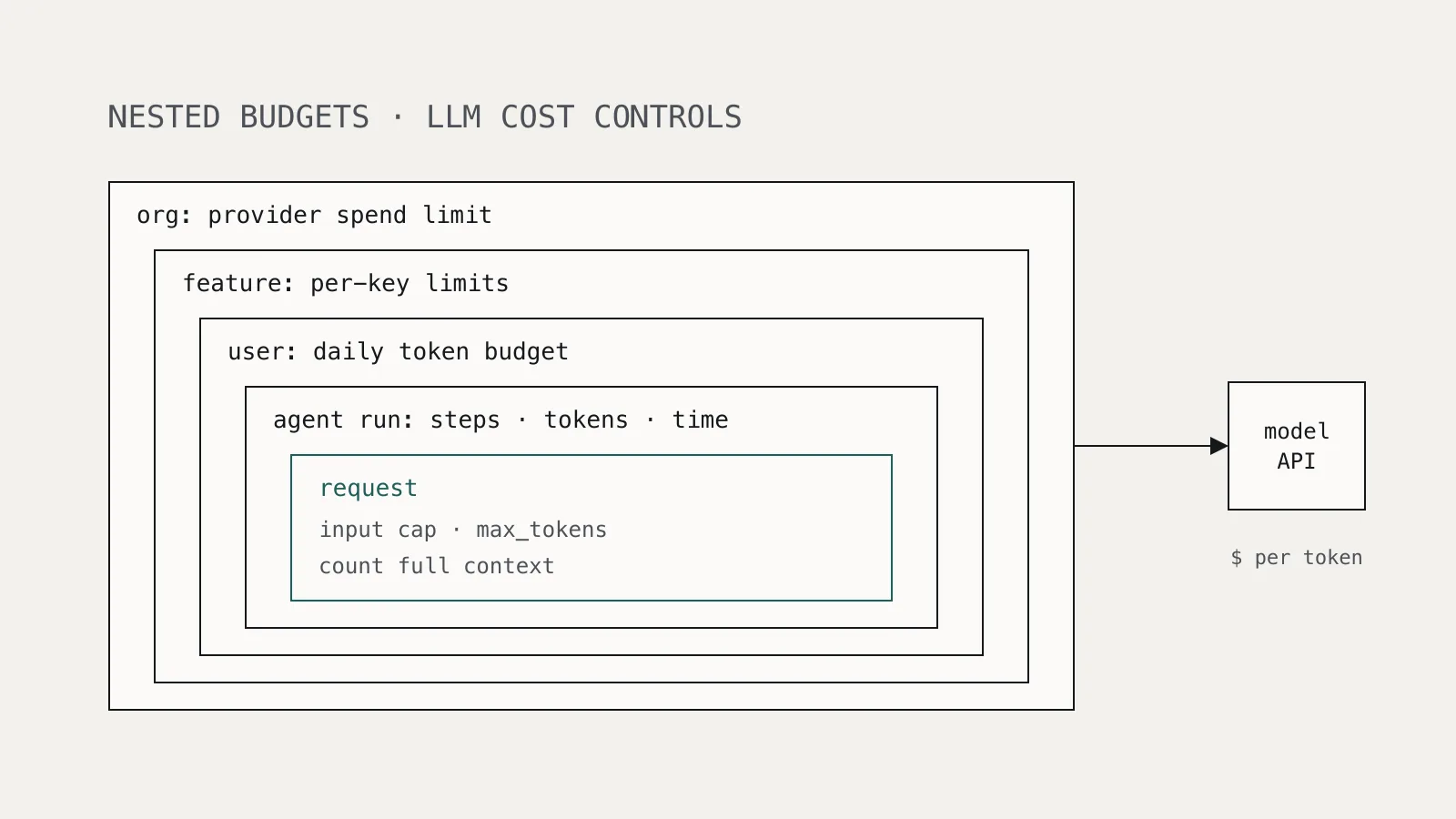
Think of it as nested budgets, from the single request out to the organization. Each layer should fail before the one outside it.
1. Per request: cap input and output
Reject or truncate oversized input before calling the model, and always set max_tokens. These are the only per-request bounds you fully control.
MAX_INPUT_TOKENS = 8_000
MAX_OUTPUT_TOKENS = 1_024

def build_request(user_text: str, history: list[dict]) -> dict:
    if count_tokens(user_text, history) > MAX_INPUT_TOKENS:
        raise InputTooLarge("Shorten the message or start a new conversation")
    return {
        "model": MODEL,
        "max_tokens": MAX_OUTPUT_TOKENS,
        "messages": history + [{"role": "user", "content": user_text}],
    }
Count the whole context, not just the new message. Conversation history and retrieved documents are where input size quietly grows.
2. Per user: a token or cost budget
Track spend per authenticated user over a sliding window and refuse new work when the budget is exhausted. Compute cost from the usage numbers the provider returns, not from your estimate.
def charge(user_id: str, usage) -> None:
    cost = (usage.input_tokens * PRICE_IN + usage.output_tokens * PRICE_OUT)
    spent = redis.incrbyfloat(f"spend:{user_id}:{today()}", cost)
    redis.expire(f"spend:{user_id}:{today()}", 2 * 86_400)
    if spent > DAILY_USER_BUDGET:
        flag_for_review(user_id, spent)

def check_budget(user_id: str) -> None:
    spent = float(redis.get(f"spend:{user_id}:{today()}") or 0)
    if spent >= DAILY_USER_BUDGET:
        raise BudgetExceeded("Daily usage limit reached")
Key the budget on the authenticated identity, never on a value the client sends. For anonymous or free tiers, budgets need to be small and tied to something costly to create, such as a verified account.
3. Per agent run: bound the loop
Agents multiply calls. Give every run a hard ceiling on steps, tool calls, total tokens, and wall-clock time, and stop the run when any one is hit.
@dataclass
class RunLimits:
    max_steps: int = 20
    max_total_tokens: int = 200_000
    max_seconds: int = 300
Log the reason a run stopped. A spike in runs that end on max_steps is often a broken tool or a prompt-injection attempt, which is why least-privilege tool design matters too, as covered in prompt injection is an access-control problem.
4. Per feature and environment: separate keys and limits
Give each feature or workload its own API key, and where the provider supports it, its own lower limits. Anthropic lets organizations set custom spend and rate limits per workspace, and notes that organization-wide limits always apply on top. Separate keys mean one leaked or misbehaving key cannot consume the whole organization's capacity, and they make spend attributable.
5. Organization: the provider spend limit
Set a spend limit at the provider below what you could tolerate losing. Treat it as a backstop. When it trips, every feature stops at once.
Handle the failure explicitly. Anthropic's documentation states that a user-set spend limit returns HTTP 400 with invalid_request_error, while the tier spend cap returns HTTP 429 with no retry-after header. Code that blindly retries every 429 will keep failing until access resumes, so detect these cases and degrade gracefully instead of retrying.
How do you protect the keys themselves?
Budgets limit what your application spends. A stolen key bypasses your application entirely, so the only limits that apply are the provider's.
- Keep keys server-side. A model key in a mobile app, browser bundle, or public repository is a key anyone can use.
- Scope keys per workload and rotate them on a schedule and immediately after any suspected exposure.
- Restrict cloud permissions. If you call models through a cloud platform, grant model-invocation permissions only to the roles that need them. Sysdig's LLMjacking recommendations include least-privilege permissions and central limits through AWS Service Control Policies.
- Keep invocation logging on. The attackers in the Sysdig report checked for it, which tells you it is worth having.
Secrets used by CI and coding agents deserve the same care; see running AI coding agents in GitHub Actions without leaking secrets.
What should you monitor and alert on?
Most denial-of-wallet incidents are visible in usage data hours before the invoice arrives. Alert on:
- Daily spend per key and per workspace above a multiple of its trailing average.
- Usage from a key at times or in regions where that workload does not run.
- Any single user consuming a large share of a feature's daily tokens.
- Calls to models your applications do not use. Model access probes in an account that never uses that model are a strong signal.
- Agent runs ending on step, token, or time ceilings.
Is denial of wallet only about money?
No. Inputs can also be crafted to maximize compute. Shumailov and colleagues showed in Sponge Examples: Energy-Latency Attacks on Neural Networks, presented at IEEE EuroS&P, that crafted inputs increased energy consumption by a factor of 10 to 200 on vision and language models. For self-hosted models, the cost shows up as latency and GPU saturation rather than an invoice, so the same per-request and per-user limits apply, plus timeouts on generation.
A checklist for LLM cost controls
- Every model call sets
max_tokensand an input size limit, counted over the full context. - Spend is metered per authenticated user from provider-reported usage, with a daily budget.
- Agent runs have ceilings on steps, tokens, and time, and log why they stopped.
- Each feature or environment uses its own key with its own limits.
- A provider spend limit sits above the sum of your internal budgets.
- Spend-limit and rate-limit errors are handled distinctly; spend-limit errors are not retried.
- Keys never ship to clients and are rotated on exposure.
- Alerts fire on spend anomalies per key, unused-model calls, and agent ceiling hits.
Record each system's limits and budget owner alongside its entry in your AI model inventory, so the person paged at 3 a.m. knows who can approve raising a limit, and who should be told when one trips.