The 302.ai leak: what an AI aggregator stores about your prompts, and how to vet one
An AI aggregator left 17.6 million files of chats, uploads, and generated media in an open Azure bucket. What to ask before routing traffic through one.
- Published
- Reading time
- 7 min read
Key takeaways
- Cybernews researchers found 17.6 million files, about 22.72TB, from the AI aggregator 302.ai in an unsecured Azure storage bucket, including more than 144,000 chat logs.
- An AI aggregator or model gateway receives the full content of every prompt, upload, and response routed through it, so it belongs in vendor and data protection review like any other data processor.
- Before adopting a model gateway, confirm in writing whether it stores prompts, outputs, and uploaded or generated files, for how long, in which storage, and how a customer can delete them.
- Where a gateway offers it, enforce no-retention routing per request in code, such as OpenRouter's provider.zdr or data_collection set to deny, instead of relying on an account toggle.
- If you run your own gateway on Azure, set allowBlobPublicAccess to false on every storage account and use an Azure Policy deny rule so no one can turn anonymous access back on.
On this page
- What did the 302.ai exposure include?
- Why do aggregators and gateways concentrate risk?
- What should you ask before routing traffic through an aggregator?
- Retention
- Storage and access
- Downstream providers
- How do you enforce no-retention routing in code?
- How do you keep your own gateway's storage private?
- What should you do this week?
On October 21, 2026, Cybernews researchers reported that 302.ai, an AI aggregator that gives customers access to models such as ChatGPT, Claude, Grok, DeepSeek, and Gemini through one service, had left 17.6 million files (about 22.72TB) in an unsecured Azure storage bucket. The lesson for engineering and security teams is direct: a model aggregator or gateway sees the full content of everything you route through it, and anything it stores can leak. Treat it as a data processor that needs vendor review, not as a thin pass-through API.
This article summarizes what was exposed, explains why aggregators concentrate risk, and gives a checklist for vetting one, or for hardening the gateway you run yourself.
What did the 302.ai exposure include?
According to Insurance Business's report on the Cybernews research, the bucket held:
- Nearly 9TB of images, 7.7TB of video, and 5.6TB of audio, largely generated media.
- More than 144,000 chat logs in
.jsonfiles and more than 26,000.zipconversation archives. - Documents, including files users had uploaded for analysis.
The chat logs contained user prompts and model replies, timestamps, the model used, token costs, and other metadata. Some logs held personal details that users had typed in themselves, such as birth dates, contact details, and home addresses. Several conversations came from a business customer's customer service chatbot, which means end users who never chose 302.ai had their conversations stored there anyway.
The timeline matters. Cybernews says it found the bucket on August 2 and notified the company on August 11, and it did not observe the bucket closed until September 8. The researchers said they saw no sign that malicious actors had copied the data, but cautioned that others may have found it. The report does not mention exposed passwords or API keys, so do not assume credential compromise. The issue is content.
Why do aggregators and gateways concentrate risk?
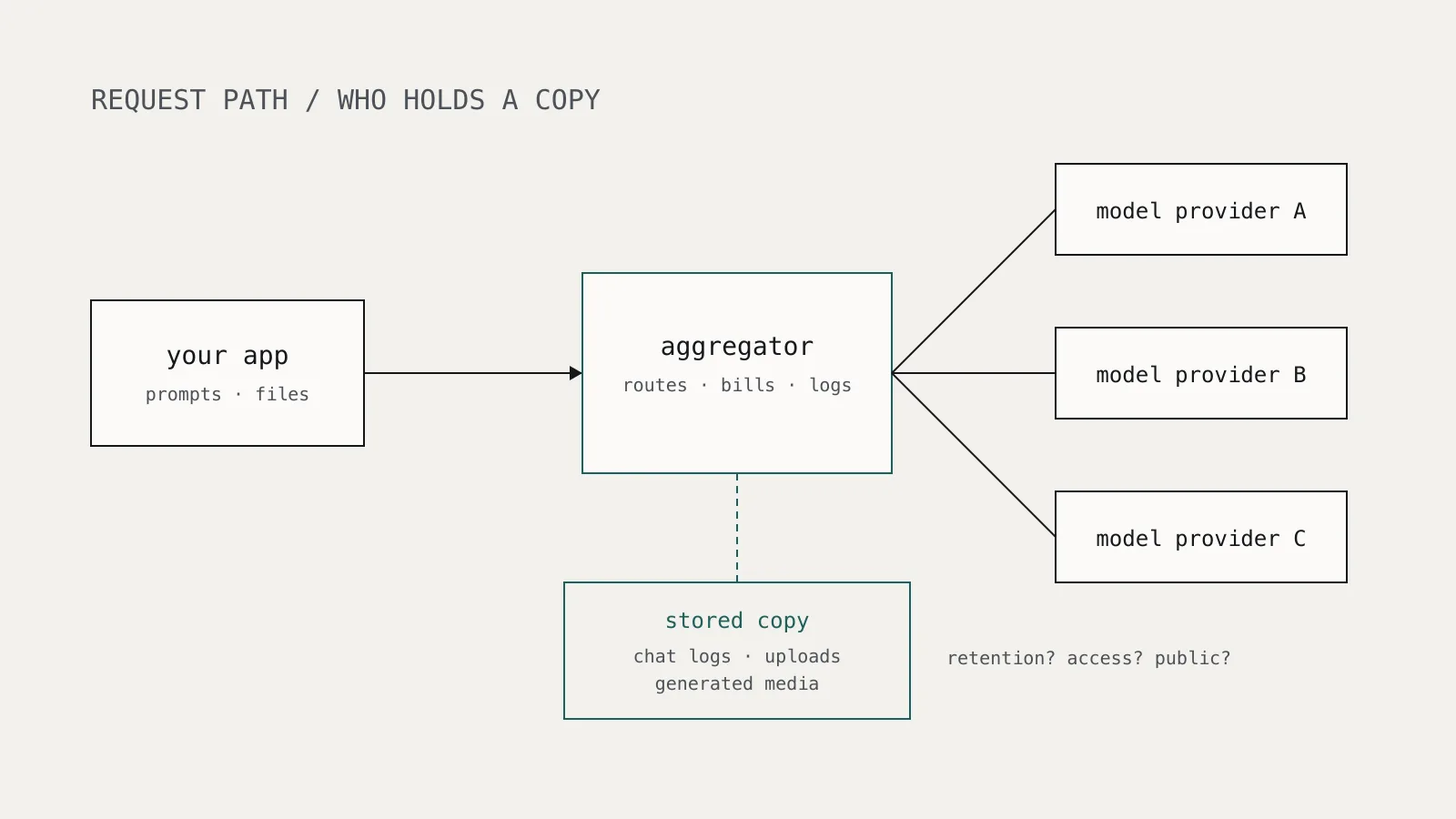
An aggregator sits between your application and the model providers. To route, bill, and debug requests it has to handle the full request and response. Whether it also keeps them is a product decision, and features such as chat history, file uploads, image and video generation, and usage dashboards all push toward keeping more.
That creates three problems for a buyer:
- A second copy of your data. Even if your model provider has a strict retention policy, the aggregator in front of it may not. Your data protection posture is the weaker of the two.
- Many tenants in one store. One misconfigured bucket exposed data from many customers and their end users at once.
- Invisible to your users. A company that embeds an aggregator in its support chatbot passes its customers' conversations to a party those customers have never heard of.
OWASP's LLM02:2025 Sensitive Information Disclosure covers this class of failure. It recommends clear policies on data retention, usage, and deletion, along with strict access controls and redaction of sensitive data before it reaches the model. Those recommendations apply to every party in the request path, not just the model provider.
The same reasoning applies to a self-hosted gateway such as LiteLLM. Running it yourself removes one third party, but you now own its logs, its database, and its supply chain (see the LiteLLM 1.107.0 compromise).
What should you ask before routing traffic through an aggregator?
Get answers in writing, ideally in the contract or data processing agreement, not only in a marketing page.
Retention
- Are prompts and completions stored by default? If logging is optional, is it off by default and set per account or per request?
- Are uploaded files and generated images, audio, and video stored? For how long? These are often kept far longer than text because users expect to download them later.
- Is any of your data used to train or improve the service, and is that opt-in?
- Can you delete stored data through an API, and does deletion cover backups?
Storage and access
- Where is content stored (provider, region), and is it encrypted with keys you can control?
- Who at the vendor can read stored content, and is that access logged?
- How does the vendor prevent public exposure of its storage? Ask whether it enforces this with policy rather than per-bucket settings.
- Has it had an independent security assessment, and will it share the report?
Downstream providers
- Which model providers can a request be routed to, and what are each provider's retention terms?
- Can you restrict routing to providers that do not retain data?
- How and how fast will it notify you of a security incident?
The 302.ai timeline is a useful benchmark for question 11: more than four weeks passed between the researchers' notification and the observed fix.
How do you enforce no-retention routing in code?
Account settings get changed. Where an aggregator lets you set data handling per request, put it in the client code so every call carries it and code review catches its removal.
OpenRouter is one example. Its data collection documentation says it does not store prompts or responses by default and that input and output logging is opt-in. Its provider routing options include zdr, which restricts a request to zero-data-retention endpoints, and data_collection, which when set to "deny" limits routing to providers that do not collect user data. The default for data_collection is "allow", so you have to set it.
{
  "model": "your-model-id",
  "messages": [{ "role": "user", "content": "Summarize this ticket" }],
  "provider": {
    "zdr": true,
    "data_collection": "deny"
  }
}
Wrap this in your shared client so individual services cannot forget it, and add a test that fails if the field is missing. Check whether your aggregator rejects a request it cannot route under these constraints or silently falls back. You want it to fail closed.
Retention settings do not reduce what the aggregator sees in transit. Strip or tokenize data you do not need to send before it leaves your boundary. The same redaction approach we described for logging LLM applications without a privacy problem works at the gateway boundary too.
How do you keep your own gateway's storage private?
If you run a gateway or chatbot that stores conversations or files in Azure Blob Storage, the specific control is the storage account's allowBlobPublicAccess property. Microsoft's guidance on remediating anonymous read access explains that setting it to false at the account level overrides every container's setting. Containers already set to allow anonymous access stop accepting anonymous requests.
Check and set it with the Azure CLI:
az storage account show \
  --name mystorageacct \
  --resource-group my-rg \
  --query allowBlobPublicAccess \
  --output tsv

az storage account update \
  --name mystorageacct \
  --resource-group my-rg \
  --allow-blob-public-access false
A blank result from the first command means the property was never explicitly set, and Microsoft's bulk remediation script treats that the same as allowed. To check every account at once, the same guidance gives an Azure Resource Graph query:
resources
| where type =~ 'Microsoft.Storage/storageAccounts'
| extend allowBlobPublicAccess = parse_json(properties).allowBlobPublicAccess
| project subscriptionId, resourceGroup, name, allowBlobPublicAccess
Then assign an Azure Policy with the deny effect on any storage account where allowBlobPublicAccess is not false. That blocks creating a non-compliant account and blocks configuration changes to one, so a later "quick fix" cannot reopen the bucket. Microsoft notes one exception: the $web container used for static websites is always publicly readable, so never store conversation data there.
What should you do this week?
- List every aggregator and gateway in your request path, including ones embedded in vendor products you use. Add them to your AI model inventory as data processors.
- Send the retention and storage questions above to each external aggregator and record the answers.
- Set no-retention routing per request where the service supports it, and test that it fails closed.
- Redact before the gateway, not only before your own logs.
- For self-hosted gateways, audit
allowBlobPublicAccess(or your cloud's equivalent), enforce it with policy, and alert on anonymous reads. - Tell your users which third parties handle their conversations. The 302.ai case showed that a chatbot's end users can be exposed by a vendor they never chose.
None of this is specific to one aggregator. Any service that holds a copy of your prompts and files is part of your attack surface, whether or not you think of it as storage.