EMBRACE: how the embedded browsers in AI coding assistants became an attack surface
Forever Security's EMBRACE research found code execution, file theft, and URL spoofing in the embedded browsers of five AI coding tools. What to check.
- Published
- Reading time
- 6 min read
Key takeaways
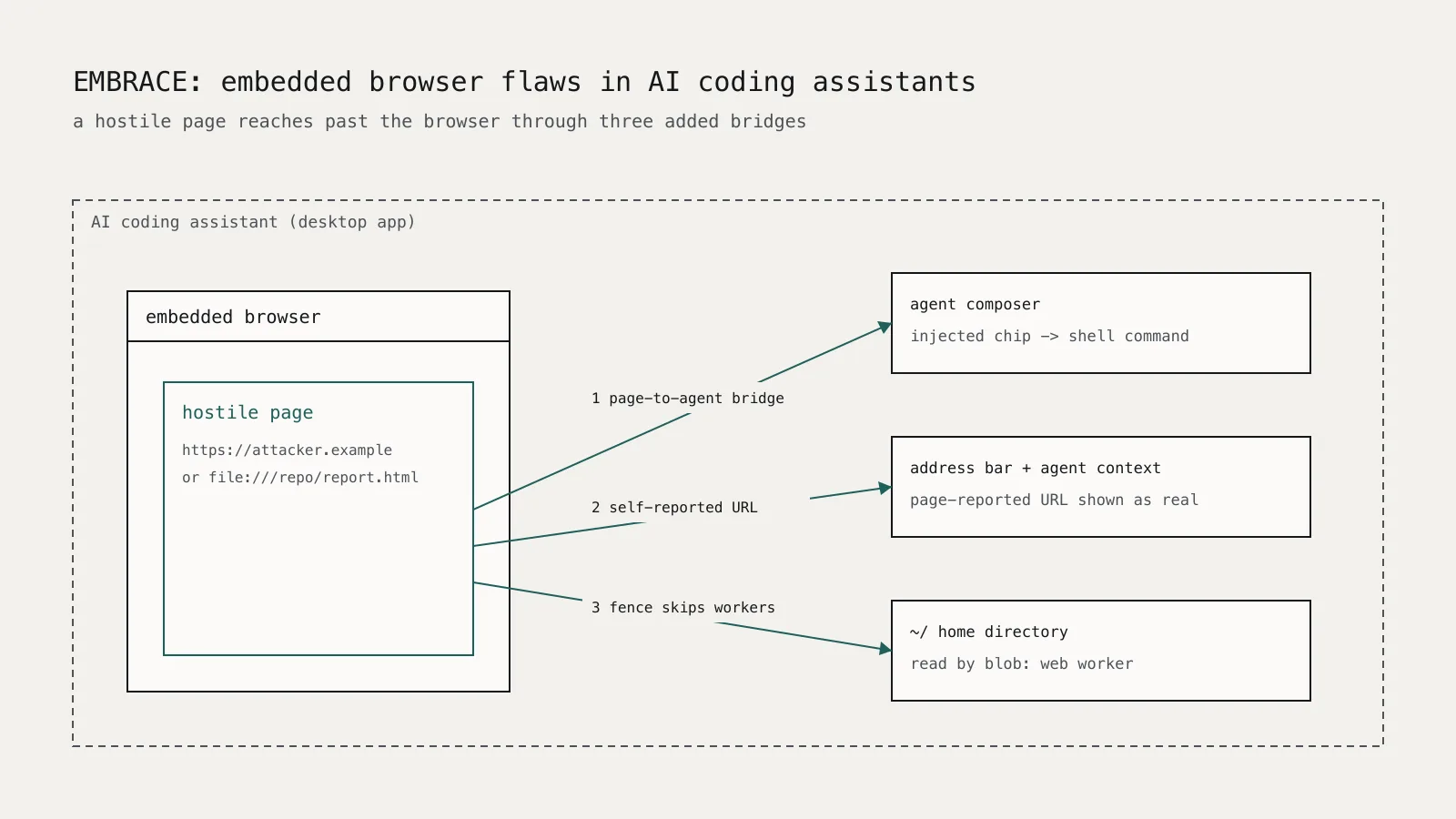
- EMBRACE is Forever Security's name for flaws where AI coding assistants give their embedded browser powers a normal browser withholds, such as a page-to-agent bridge or self-reported addresses.
- In Cursor, any page in the integrated browser could send content into the agent's composer through window.cursorBrowser.send, which researchers chained into code execution; Cursor patched it on October 1, 2026 without an advisory.
- GitHub Copilot 1.1.27 let a page report its own URL to the app, spoofing the address shown to both the user and the agent; version 1.1.29, released October 13, 2026, fixes it.
- In Codex and VS Code, a malicious local HTML page opened with one click could read files outside the project; the researchers said on October 29, 2026 that both issues remain unpatched.
- Until vendors fix these issues, treat links and file:// pages that a coding assistant renders from an untrusted repository as untrusted code, and open unfamiliar projects in a disposable environment.
On this page
- What is EMBRACE?
- Which tools were affected, and what is fixed?
- How did the Cursor attack reach code execution?
- How did the file-read attacks work?
- What should developers and security teams do now?
- Update and verify versions
- Stop clicking agent-rendered local links from untrusted projects
- Open unfamiliar repositories somewhere disposable
- Tighten agent auto-run
- Make VS Code ask before trusting a folder
- Watch for exfiltration from developer machines
- What should vendors take from this?
AI coding assistants now ship with their own browser, for previews, docs, and agent-driven testing. Forever Security's EMBRACE research, published on October 29, 2026, shows that five of them gave that browser powers an ordinary browser deliberately withholds, and that a hostile page can use those powers to run code, read files outside the project, or fake the address bar. Cursor and GitHub Copilot have shipped fixes. The researchers say the file-read issues in OpenAI Codex and Microsoft VS Code remain open.
This article reflects the Forever Security write-up and The Register's report as of October 31, 2026. No CVEs had been assigned in either source.
What is EMBRACE?
EMBRACE stands for "EMbedded BRowser." The researchers' argument is that a browser's security model depends on what a page cannot do: it cannot talk to the host application, it cannot choose the URL shown in the address bar, and a local file page should not read the rest of your disk. Each of the five assistants added one convenience that broke one of those assumptions.
None of these additions is unreasonable by itself. A preview that tells the agent which element you clicked is useful. So is an address bar that follows client-side navigation. The trouble is that each feature is reachable by whatever page is loaded, including one an attacker controls.
Which tools were affected, and what is fixed?
| Tool | What the page could do | Status on October 29, 2026 |
|---|---|---|
| Cursor | Inject instructions into the agent composer, leading to code execution | Patched October 1, no advisory |
| GitHub Copilot | Spoof the URL shown to the user and the agent | Fixed in 1.1.29 (October 13); 1.1.27 confirmed affected |
| Claude Desktop | Read files outside the workspace through a web worker | Reported fixed; see below |
| OpenAI Codex | Read arbitrary local files with a plain fetch | Unpatched; OpenAI told The Register it is working on a fix |
| VS Code | Read files outside the workspace through a web worker | Unpatched; Microsoft treated it as a Workspace Trust issue |
For Claude Desktop, Forever reported the issue on July 23 and Anthropic initially declined it. A day later Noma Security reported the same web worker bypass as part of its separate "SneakPeek" research, and Anthropic accepted that report. Noma says the final fix shipped on August 17, 2026 in Claude Desktop 1.30096.1 and later. Confirm the version on your machines rather than relying on auto-update.
How did the Cursor attack reach code execution?
Cursor's integrated browser exposed a window.cursorBrowser.send(...) bridge. According to the researchers, any page from any origin could call it, without a user gesture, to push content into the agent's composer.
The proof of concept forged an "element-selected" chip, the kind the browser normally creates when you point at part of a page. Hidden attributes split a shell command across fields, and the agent reassembled and ran it. With auto-run enabled and an empty allowlist, the user saw one card that ran on Enter. When the sandbox blocked npm install, the agent retried in a way that let the package's preinstall script run with full privileges.
The researchers describe success as probabilistic and model-dependent. That does not make it safe. It is the same lesson as prompt injection as an access-control problem: anything a page can write into the agent's context is untrusted input, and the agent must never treat it as the user's request.
How did the file-read attacks work?
Claude Desktop, Codex, and VS Code each rendered local HTML from a file:// URL. Browsers normally give file pages an opaque origin so they cannot fetch neighboring files. In these apps the page kept a real file:// origin.
Two of the apps added a fence that limited reads to the project folder, but enforced it only in the top-level document. A web worker created from an in-memory blob: URL ran outside the fence and could read any file the user could. Codex had no fence at all, so a single fetch("file:///...") from the page was enough.
On macOS the researchers used .DS_Store index files to list directory contents, walked outward from the home folder, and sent what they found to a remote server.
Delivery took one click. The victim opened a repository dressed up as a financial report and asked the assistant to "set up the project per the README." The assistant rendered a link to the malicious local page, and the victim clicked it. This is the same delivery path as the AGENTS.md instruction-file hijack: the attacker only needs you to open their repository in a tool that trusts its contents.
What should developers and security teams do now?
Start with the fixes that exist, then reduce how much a hostile page can reach.
Update and verify versions
- Update GitHub Copilot to 1.1.29 or later.
- Update Cursor to a build released on or after October 1, 2026.
- Confirm Claude Desktop is on 1.30096.1 or later.
- Track the Codex and VS Code issues and update as soon as fixes ship.
If you manage developer endpoints, pull installed versions from your MDM or software inventory instead of asking people to check.
Stop clicking agent-rendered local links from untrusted projects
Until Codex and VS Code are fixed, do not open file:// HTML pages, or links the assistant renders to them, from a repository you did not write. The exploit needs that click.
Open unfamiliar repositories somewhere disposable
Clone untrusted code into a dev container, VM, or cloud workspace that has no SSH keys, cloud credentials, or browser profile in its home directory. A file-read bug cannot steal what is not on the disk. This is the same advice we gave for MCP sign-in flows that run code: assume the tool will eventually be tricked, and limit the blast radius.
Tighten agent auto-run
Cursor's chain depended on auto-run with an empty allowlist. Turn auto-run off for terminal commands, or restrict it to a short allowlist of read-only commands. Do not allowlist package managers, since npm install runs arbitrary lifecycle scripts. The point is to require a human decision before anything installs packages or reaches the network.
Make VS Code ask before trusting a folder
By default VS Code opens new folders in Restricted Mode with only a banner. To get an explicit decision the first time each folder opens, set the startup prompt in your user settings:
{
  "security.workspace.trust.enabled": true,
  "security.workspace.trust.startupPrompt": "once"
}
These settings are documented in VS Code's Workspace Trust guide. They do not fix the file-read issue, but they make "trust this folder" a deliberate choice rather than a reflexive click.
Watch for exfiltration from developer machines
The file-read chain ends with an outbound request to an attacker's server. Endpoint and egress monitoring that flags an IDE or assistant process uploading large amounts of data to an unfamiliar domain will catch the last step even when you missed the first.
What should vendors take from this?
The EMBRACE findings come down to one design rule: every capability you add to an embedded browser is a capability you give to every page it loads. Concretely, the research suggests:
- Bridges from page to app or agent should check the calling origin and require a real user gesture.
- The address bar should show the browser's actual location, never a URL the page reports.
- Local HTML should load with an opaque origin, or from a sandboxed scheme, and path checks must cover workers, iframes, and every other execution context.
- Agents should label browser-sourced content as untrusted and never auto-run commands derived from it.
The vendor responses also matter for risk owners. One fix shipped silently, one report was rejected and then accepted from another researcher, and two remain open. If your developers rely on these tools, track vendor security advisories and release notes yourself rather than waiting for a CVE to appear in your scanner.