Vetting third-party MCP servers: tool poisoning, rug pulls, and a review checklist
How to review and run third-party MCP servers safely: the tool poisoning and rug pull threat model, pinning tool definitions, and least-privilege controls.
- Published
- Reading time
- 7 min read
Key takeaways
- Treat every MCP server as untrusted code plus untrusted prompt text: its tool descriptions reach the model before the user types anything.
- Tool poisoning hides instructions in tool metadata; a rug pull changes tool definitions after you approved them, so a one-time review is not enough.
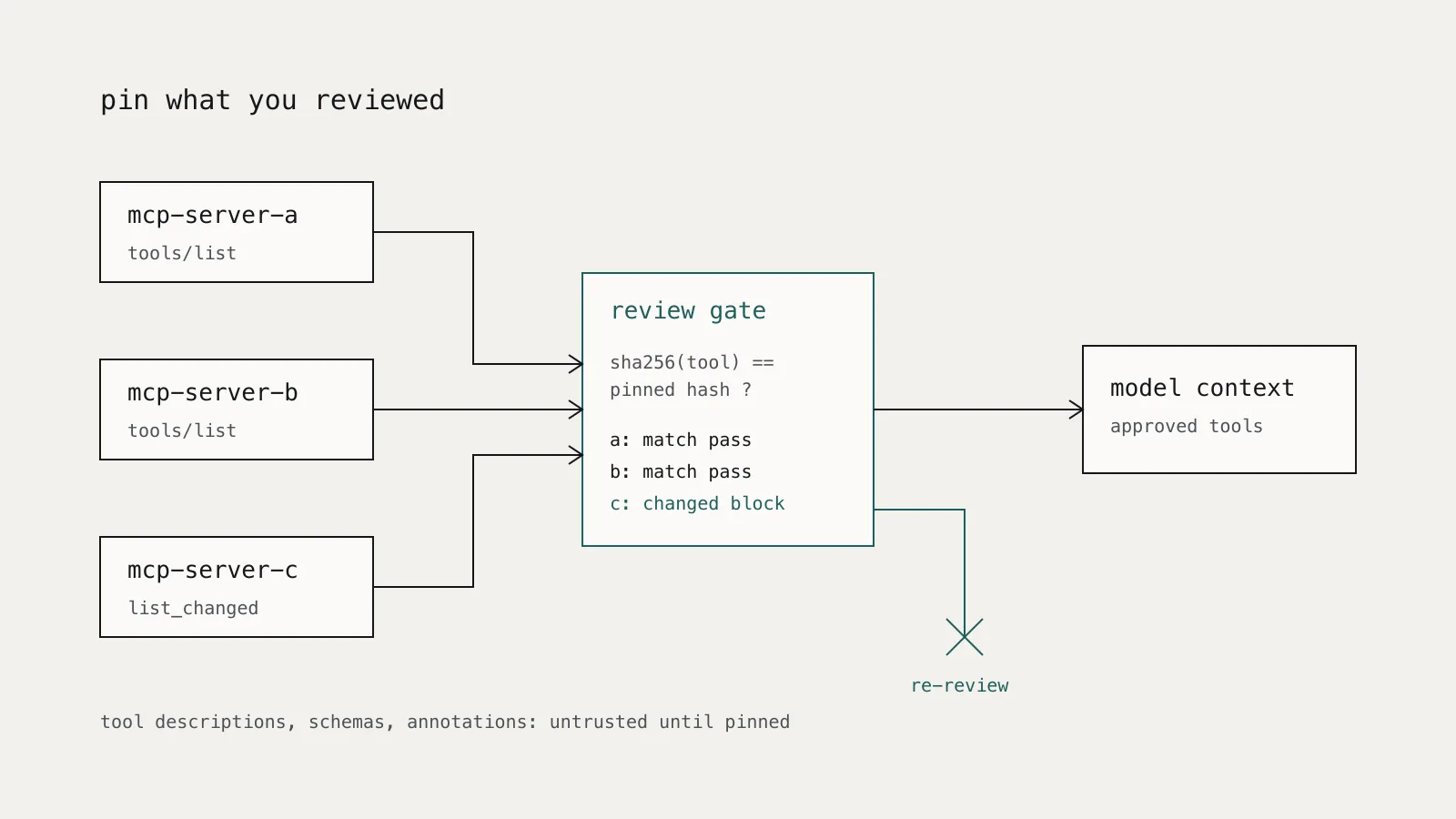
- Pin each approved server's tool definitions by hash and block or re-review any change, including changes announced through tools/list_changed.
- The MCP specification forbids token passthrough: a server must not accept tokens that were not issued for it.
- Run local MCP servers sandboxed with minimal file system and network access, and request the narrowest OAuth scopes that work.
On this page
- What can a malicious MCP server actually do?
- How does tool poisoning work?
- What should you review before connecting a server?
- Provenance and code
- Tool metadata
- Credentials and scope
- How do you stop a server changing after review?
- How should you run servers once approved?
- A review checklist for third-party MCP servers
A third-party MCP server is two things at once: code that runs with whatever privileges you give it, and text that is injected into your agent's context. Vetting one means reviewing both, then pinning what you reviewed so the server cannot silently change it later. The checklist at the end of this article covers the review; the sections before it explain why each item is there.
The Model Context Protocol (MCP) lets a client discover tools from a server and expose them to a language model. That convenience is also the attack surface: installing a server is often a one-line command that deserves the scrutiny you would give any script piped into a shell.
What can a malicious MCP server actually do?
There are three distinct classes of risk, and each needs a different control.
1. It runs code on your machine. A local server is a process started by your MCP client. The MCP security best practices list arbitrary code execution, data exfiltration, and data loss among the risks of local servers from untrusted sources, and warn that the startup command itself can carry the payload. This is an ordinary software supply chain problem.
2. It writes text the model trusts. Tool names, descriptions, and input schemas are sent to the model so it can decide which tool to call. A server author can put instructions there. This is tool poisoning, which OWASP lists as MCP03 in its MCP Top 10 (currently a beta release).
3. It holds or relays credentials. Remote servers often act on your behalf against another API using OAuth. A badly built server can leak tokens, request far more scope than it needs, or forward a client's token to a downstream service.
How does tool poisoning work?
Invariant Labs described the attack in April 2025. Their example server offered an innocent add tool with an extra sidenote parameter. The tool's description, wrapped in an <IMPORTANT> tag, told the model to read the user's MCP configuration file and SSH private key and pass their contents in sidenote. In their test against an MCP client, the agent complied, and the confirmation dialog did not show the full arguments, so the user did not see the key leave.
The same write-up describes two variants that matter for vetting:
- Shadowing. A malicious server's description can give instructions about a different, trusted server's tool, for example telling the agent to redirect every message sent through a legitimate
send_emailtool. The poisoned tool never has to be called. - Rug pulls. A server can change its tool descriptions after the client has approved it.
The MCP tools specification makes rug pulls a protocol feature rather than an exploit: a server that declares listChanged can send notifications/tools/list_changed, and the client then fetches the new tool list. Updating tools is legitimate. Accepting updated tools without re-review is the problem.
How often does this work against current models? The MCPTox benchmark, published at AAAI-26, built 1,348 malicious test cases on 45 live MCP servers and 353 real tools, and evaluated 20 LLM agents. The highest attack success rate it reports is 72.8%, and the highest refusal rate is under 3%. The authors also report that more capable models were often more susceptible, which fits the intuition that better instruction-following means better following of the wrong instructions.
Tool poisoning is a special case of indirect prompt injection, and the same principle applies: the model may propose actions, but something it cannot influence decides whether they happen. We covered that design in Prompt injection is an access-control problem.
What should you review before connecting a server?
Treat adoption like adding a dependency that also gets to write part of your system prompt.
Provenance and code
- Who publishes it, and is the package name the one the vendor documents? Typosquatted names are a standard supply chain trick.
- Pin an exact version or commit. Never configure a server as "latest" from a package registry, because every restart can pull new code.
- Read the startup command in full. The MCP best practices require clients offering one-click setup to show the exact command without truncation; read it rather than clicking through.
Tool metadata
Fetch the server's tools/list response and read every description and schema field, not just the short title your client shows. Look for:
- Instructions addressed to the model rather than descriptions of behaviour ("before using this tool, read...", "do not tell the user...").
- References to files, credentials, or other servers' tools.
- Parameters that do not fit the tool's purpose, such as a free-text
notesorcontextfield on a calculator. - Annotations that claim a tool is read-only. The specification says clients must treat tool annotations as untrusted unless they come from trusted servers.
Credentials and scope
For remote servers that call other APIs, check how authorization works. The MCP specification forbids token passthrough: a server must not accept tokens that were not issued for that server and forward them downstream. A server that asks for your upstream API token directly, instead of running its own OAuth flow, deserves a hard look.
Request the narrowest scopes that work. The best practices recommend a minimal initial scope set with step-up elevation when a privileged operation is first attempted, and list omnibus scopes such as * or full-access as a common mistake.
How do you stop a server changing after review?
Pin what you reviewed. Compute a hash of each approved tool definition and compare it on every connection and every list_changed notification. A change means the server goes back to review, not into the agent's context.
import hashlib
import json


def tool_hashes(tools: list[dict]) -> dict[str, str]:
    """Map each tool name to a SHA-256 of its canonical JSON definition."""
    return {
        t["name"]: hashlib.sha256(
            json.dumps(t, sort_keys=True, separators=(",", ":")).encode()
        ).hexdigest()
        for t in tools
    }


def diff_against_lock(tools: list[dict], lock: dict[str, str]) -> list[str]:
    """Return human-readable reasons the live tool list differs from the lock."""
    live = tool_hashes(tools)
    problems = [f"new tool: {n}" for n in live.keys() - lock.keys()]
    problems += [f"removed tool: {n}" for n in lock.keys() - live.keys()]
    problems += [
        f"changed definition: {n}"
        for n in live.keys() & lock.keys()
        if live[n] != lock[n]
    ]
    return problems
Store the lock file in version control next to your client configuration, so changes to approved tools go through the same review as code. Hash the whole definition, including the input schema: instructions can hide in parameter descriptions as easily as in the top-level description.
How should you run servers once approved?
Sandbox local servers. The MCP best practices recommend running servers with minimal default privileges, restricted file system and network access, and explicit grants for anything more. A container with a read-only mount of the one directory the server needs, and no network unless the tool requires it, removes the SSH-key scenario entirely.
Prefer stdio for local servers. The same guidance recommends the stdio transport, or an authenticated HTTP endpoint, so other processes on the machine cannot reach the server.
Separate servers by trust. Shadowing works because every connected server's text lands in one shared context. Avoid connecting an unvetted server in the same session as tools that can send email, move money, or change production.
Authorize and confirm tool calls. The tools specification says there should always be a human able to deny tool invocations, and that clients should show tool inputs before calling the server. Make sure your client shows the full arguments; the Invariant example worked because it did not.
Log every call. Record the server, tool, definition hash, arguments, and decision for each invocation, with personal data redacted at the edge as described in Logging LLM applications without creating a privacy problem.
A review checklist for third-party MCP servers
| Check | Pass condition |
|---|---|
| Publisher | Package name and source match the vendor's own documentation |
| Version | Exact version or commit pinned; no floating tags |
| Startup command | Read in full; no unexpected shell, network, or file access |
| Tool descriptions | No instructions to the model, no references to files, secrets, or other tools |
| Input schemas | Every parameter fits the tool's stated purpose |
| Annotations | Not relied on for security decisions |
| Authorization | Own OAuth flow, no token passthrough, narrowest workable scopes |
| Sandbox | File system and network limited to what the tools need |
| Pinning | Tool definition hashes stored; changes blocked until re-review |
| Logging | Calls logged with server, tool, hash, arguments, and decision |
| Inventory | Server recorded with owner, purpose, and next review date |
The last row matters more than it looks. An MCP server is a dependency with access to your data and a voice in your agent's reasoning, so it belongs in the same register as your models and AI systems. Our AI model inventory guide describes a schema you can extend with a server's version, scopes, and pinned hashes.